
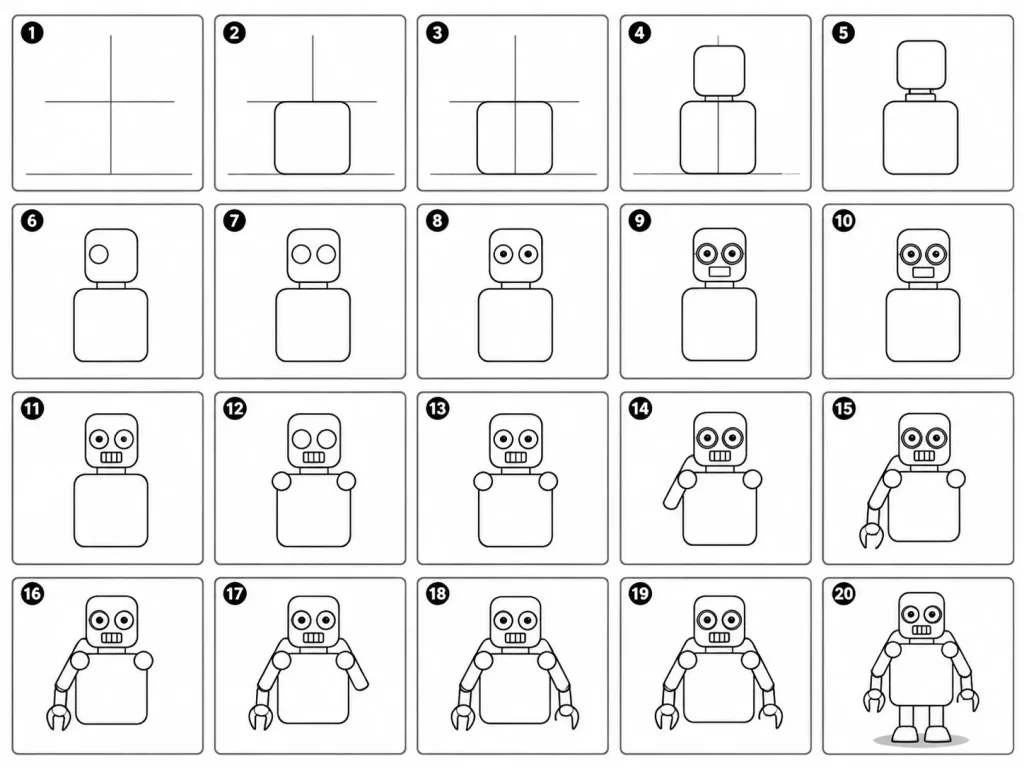
만화 로봇 단계별 그리기 가이드
기본 보조선부터 디테일까지 귀여운 만화 로봇을 그리는 20단계 튜토리얼 시트를 생성합니다. 대상 캐릭터나 단계를 변경해 다른 사물을 그리는 데 응용할 수 있습니다.
프롬프트
A 20-panel sequential drawing guide layout showing step-by-step instructions for drawing a cute cartoon robot on a white background. Each numbered panel retains all previous drawing steps and adds exactly one clear new line or shape: 1. Light construction guide lines: vertical center, horizontal center, and a ground line. 2. Add torso: rounded rectangle positioned above the ground line. 3. Add torso vertical centerline. 4. Add head: smaller rounded square placed directly above the torso. 5. Add neck connector: short rounded rectangular block. 6. Add left eye circle. 7. Add right eye circle. 8. Add pupils inside both eyes. 9. Add thin rim rings around both eyes. 10. Add rectangular mouth below the eyes. 11. Add evenly spaced vertical grille slats inside the mouth. 12. Add left shoulder joint circle on the side of the torso. 13. Add right shoulder joint circle. 14. Add left upper arm cylinder extending from the left shoulder. 15. Add left elbow joint circle and left forearm cylinder. 16. Add left claw hand with a base curve and two prongs. 17. Add right upper arm cylinder extending from the right shoulder. 18. Add right elbow joint circle and right forearm cylinder. 19. Add right claw hand matching the left hand. 20. Add two short blocky legs from the torso base, two rounded trapezoid feet, and a small soft ground shadow. Clean black-and-white line art infographic style, clear grid arrangement, instructional illustration.
프롬프트 정보
- 카테고리
- 인포그래픽 / 교육
- 모델
- Nano Banana Pro
- 이미지당 비용
- 1K: 108 크레딧 · 2K: 108 크레딧 · 4K: 193 크레딧
- 화면 비율
- 4:3
- 추가일