
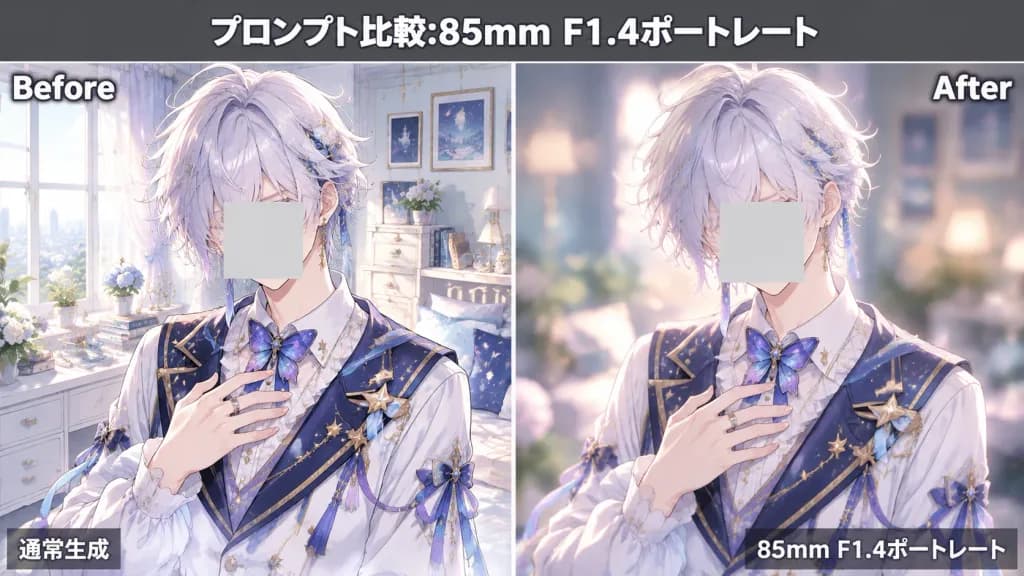
애니메이션 인물 심도 비교
일반 생성과 85mm F1.4 얕은 심도 보케 효과를 나란히 비교하는 이미지를 생성합니다. 헤어 색상이나 텍스트를 변경하여 다양하게 활용하세요.
프롬프트
Horizontal 16:9 side-by-side split-screen comparison graphic demonstrating anime portrait prompt enhancement with an 85mm F1.4 camera look, divided by a thin white vertical line with a dark gray header band across the top. Text overlays: - Top center headline in bold white Japanese text with a black drop shadow: 「プロンプト比較:85mm F1.4ポートレート」 - Left panel top-left corner: "Before" in bold white text with dark drop shadow - Right panel top-right corner: "After" in bold white text with dark drop shadow - Left panel bottom-left overlay: 「通常生成」 in clean white typography - Right panel bottom-right overlay: 「85mm F1.4ポートレート」 in clean white typography Subject: The identical anime young male character in both panels, framed from head to upper torso, hands gently resting near chest. He has [soft silver-white hair with pale lavender and blue highlights], fluffy layered tousled hair, delicate androgynous facial features, and an elegant idol appearance. Exactly one opaque muted pale-gray square censor block covers his face in each panel (two censor squares total). He wears an ornate white shirt, navy sailor-inspired vest accented with star and crescent moon motifs, dangling star accessories, a butterfly bow, and gold trims. Left panel (Before): The pastel bedroom background is rendered fully sharp and in clear focus, showing a bright window, framed pictures, drawers, potted plants, and decorative trinkets with high detail matching the character. Right panel (After): Realistic 85mm F1.4 portrait photography effect with creamy spherical bokeh, soft diffused lighting, heavily blurred background elements, strong subject separation, and warm luminous anime portrait illumination. Style: Polished modern Japanese anime illustration, pastel palette, luminous highlights, high-end fantasy idol design, clean presentation graphic without extra watermarks.
바꿔 쓸 수 있는 부분
생성하기 전에 프롬프트의 이 부분을 원하는 주제나 문구로 바꿔 보세요.
“プロンプト比較:85mm F1.4ポートレート”따옴표 안 문구“Before”따옴표 안 문구“After”따옴표 안 문구“通常生成”따옴표 안 문구“85mm F1.4ポートレート”따옴표 안 문구
프롬프트 정보
- 카테고리
- 인포그래픽 / 교육
- 모델
- GPT IMAGE 2
- 이미지당 비용
- 1K: 43 크레딧 · 2K: 86 크레딧 · 4K: 143 크레딧
- 화면 비율
- 16:9
- 추가일