
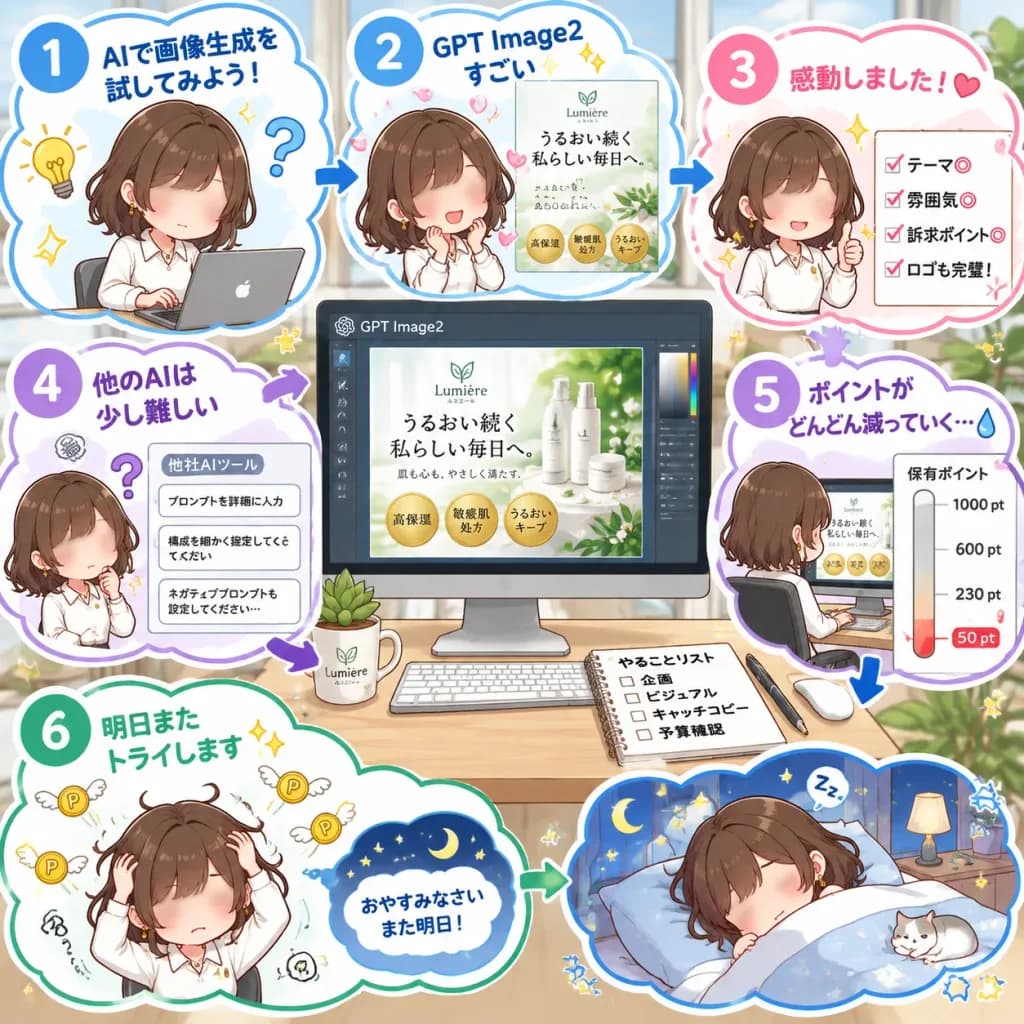
오피스 AI 포스터 디자인 애니 인포그래픽
직장인이 AI 툴로 스킨케어 포스터를 제작하는 과정을 담은 파스텔톤 일본식 만화 인포그래픽입니다. 브랜드명과 카피 문구를 변경해 튜토리얼에 맞출 수 있습니다.
프롬프트
A square Japanese social-media comic infographic illustrating a workflow of testing an AI image tool for creating a marketing campaign poster, presented in a cute chibi anime aesthetic with bright pastel tones. - Composition & Layout: 1:1 square layout structured around a central desktop computer screen. Surrounding the center are six numbered story steps inside white cloud-shaped panels with colorful outlines (blue, pink, purple, green), connected by bold directional arrows. Decorated with sparkles, doodle stars, stickers, and comic reaction icons. - Central Subject & Display: A large desk monitor displaying a design software UI labeled “GPT Image2”. The canvas shows a refined skincare advertisement for [Lumière] featuring product bottles, white petals, lush green leaves, and three gold benefit badges reading “高保湿”, “敏感肌処方”, “うるおいキープ”. Ad headline reads “[うるおい続く 私らしい毎日へ。]” with subtext “肌も心も、やさしく満たす。” and a leaf logo above “Lumière / ルミエール”. The tidy desk holds a keyboard, mouse, coffee mug, small potted succulent, and an open notebook titled “やることリスト” with checkboxes for “企画”, “ビジュアル”, “キャッチコピー”, and “予算確認”. - Recurring Character: A cute chibi anime office woman with wavy short brown hair, white blouse, and subtle gold jewelry, shown with a soft blurred anonymized face across 7 distinct states: 1. Top-left: Typing on a compact laptop. 2. Top-center: Beaming with admiration toward the preview. 3. Top-right: Giving an enthusiastic thumbs-up. 4. Mid-left: Perplexed beside a complicated prompt list. 5. Center-right: Viewed from behind/side sitting at the desk facing the monitor. 6. Bottom-left: Hands clutching her head in despair as point coins fly away. 7. Bottom-right: Cozy in bed under blankets saying good night. - Infographic Steps & Japanese Text: - Step 1 (Blue circle): “AIで画像生成を試してみよう!” with lightbulb and question mark doodles. - Step 2 (Blue circle): “GPT Image2すごい” with a mini poster mockup. - Step 3 (Pink circle): “感動しました!” with a heart and a 4-item checklist: “テーマ◎”, “雰囲気◎”, “訴求ポイント◎”, “ロゴも完璧!”. - Step 4 (Purple circle): “他のAIは少し難しい” above a card titled “他社AIツール” showing 3 stacked text prompts: “プロンプトを詳細に入力”, “構成を細かく指定してください”, “ネガティブプロンプトも設定してください…”. - Step 5 (Purple circle): “ポイントがどんどん減っていく…” with a teardrop emoji and a vertical point gauge labeled “保有ポイント” descending from “1000 pt”, “600 pt”, “230 pt” to “50 pt” in red. - Step 6 (Green circle): “明日またトライします” with sparkle icons, leading to a sleep bubble: “おやすみなさい また明日!”. - Style & Lighting: Clean Japanese commercial manga infographic, crisp vector-like line art, thick white silhouette outlines, soft cel shading, daylight office background blurred softly behind windows with indoor plants.
바꿔 쓸 수 있는 부분
생성하기 전에 프롬프트의 이 부분을 원하는 주제나 문구로 바꿔 보세요.
[Lumière]자리 표시자[うるおい続く 私らしい毎日へ。]자리 표시자“GPT Image2”따옴표 안 문구“高保湿”따옴표 안 문구“敏感肌処方”따옴표 안 문구“うるおいキープ”따옴표 안 문구“肌も心も、やさしく満たす。”따옴표 안 문구“Lumière / ルミエール”따옴표 안 문구
프롬프트 정보
- 카테고리
- 인포그래픽 / 교육
- 모델
- GPT IMAGE 2
- 이미지당 비용
- 1K: 43 크레딧 · 2K: 86 크레딧 · 4K: 143 크레딧
- 화면 비율
- 1:1
- 추가일