
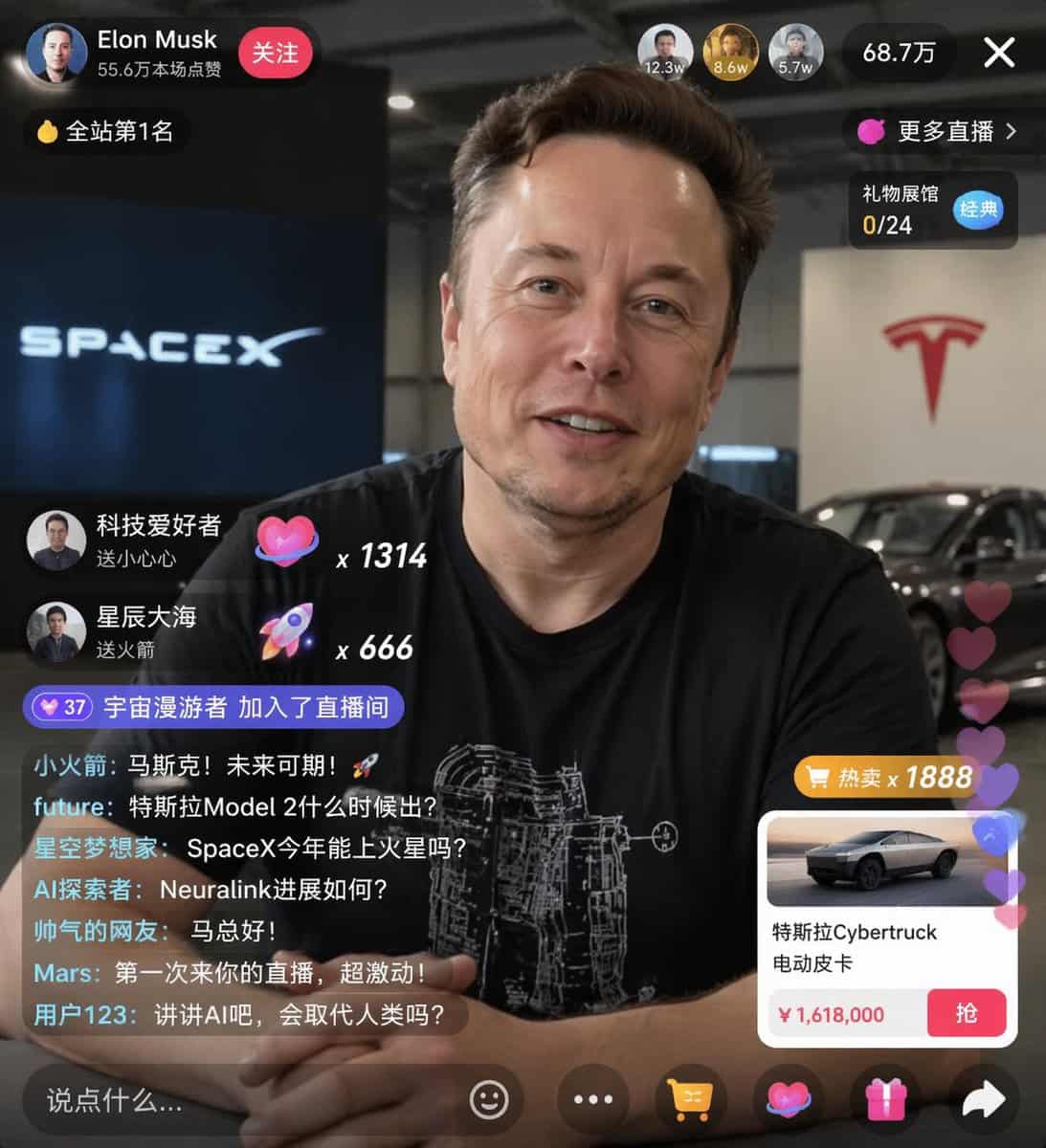
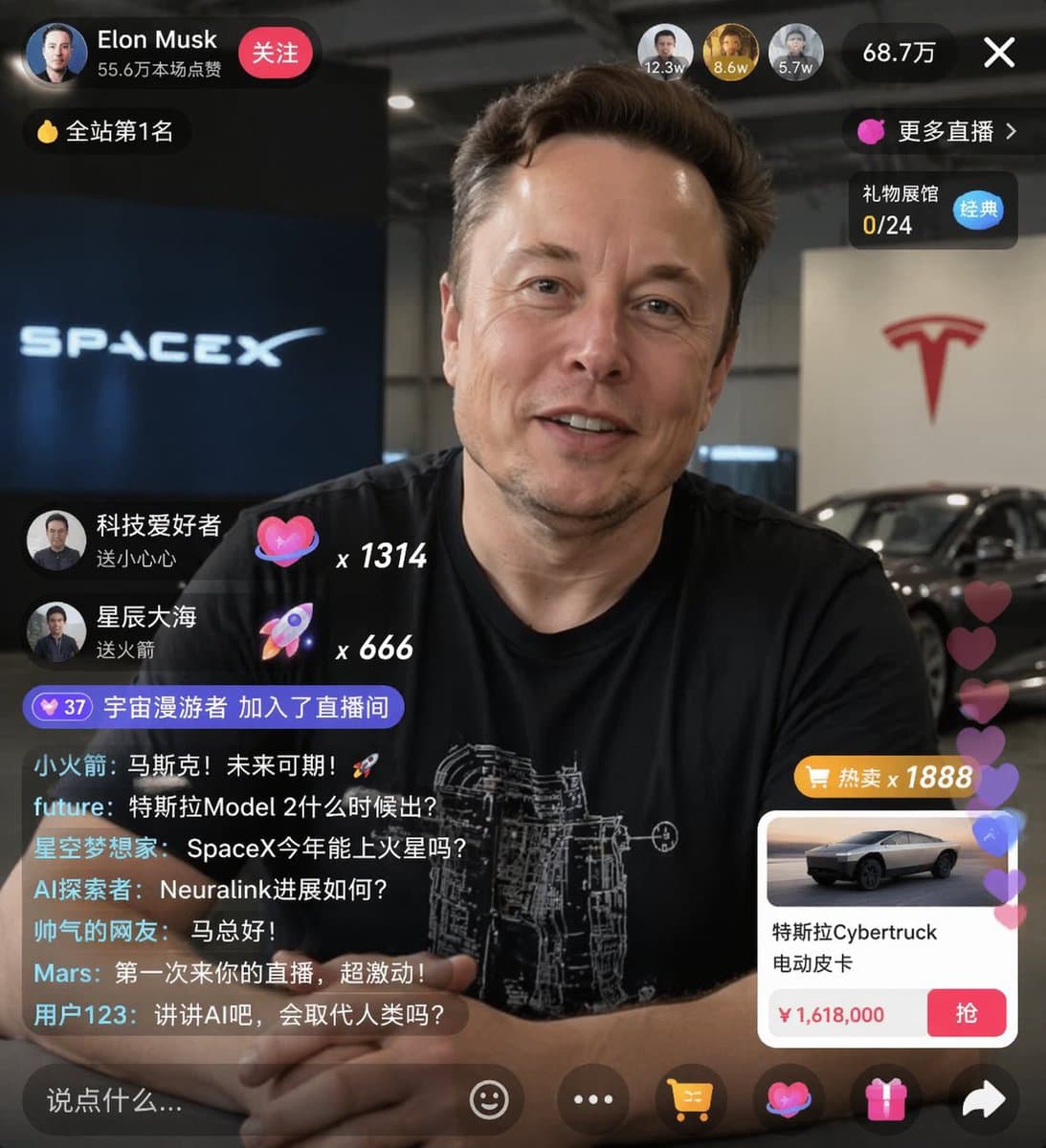
이커머스 라이브 스트림 UI 목업
{ "type": "라이브 스트림 UI 목업", "subject": { "description": "{argument name=\"host name\" default=\"Elon Musk\"}의 인물 사진, 미소 짓는 모습, 흰색 기술 도면 그래픽이 있는 검은색 티셔츠 착용", "background": "왼쪽에는 '{argument name=\"left background logo\" de…
프롬프트
{ "type": "라이브 스트림 UI 목업", "subject": { "description": "{argument name=\"host name\" default=\"Elon Musk\"}의 인물 사진, 미소 짓는 모습, 흰색 기술 도면 그래픽이 있는 검은색 티셔츠 착용", "background": "왼쪽에는 '{argument name=\"left background logo\" default=\"SPACEX\"}' 텍스트가 있는 화면, 오른쪽에는 빨간색 '{argument name=\"right background logo\" default=\"Tesla T logo\"}'와 어두운 자동차" }, "ui_overlay": { "top_header": { "host_info": "아바타, 이름 '{argument name=\"host name\" default=\"Elon Musk\"}', 부제 '55.6万本场点赞', 빨간색 '关注' 버튼", "rank_badge": "'全站第1名'이 적힌 금화 아이콘", "viewer_stats": "상위 시청자 아바타 3개와 '12.3w', '8.6w', '5.7w', 총 '68.7万', 'X' 닫기 버튼", "right_links": "'更多直播 >', 파란색 '经典' 태그가 있는 '礼物展馆 0/24'" }, "mid_left_gifts": { "count": 2, "items": [ "아바타 '科技爱好者', '送小心心', 하트 아이콘 x 1314", "아바타 '星辰大海', '送火箭', 로켓 아이콘 x 666" ] }, "bottom_left_chat": { "system_message": "레벨 37 배지 '宇宙漫游者 加入了直播间'", "message_count": 7, "messages": [ "小火箭: 马斯克!未来可期!🚀", "future: 特斯拉Model 2什么时候出?", "星空梦想家: SpaceX今年能上火星吗?", "AI探索者: Neuralink进展如何?", "帅气的网友: 马总好!", "Mars: 第一次来你的直播,超激动!", "用户123: 讲讲AI吧,会取代人类吗?" ] }, "bottom_right_product_card": { "hot_tag": "오렌지색 '热卖 x 1888'", "image": "Tesla Cybertruck", "title": "{argument name=\"product name\" default=\"特斯拉Cybertruck 电动皮卡\"}", "price": "{argument name=\"product price\" default=\"¥ 1,618,000\"}", "button": "빨간색 '抢' 버튼", "floating_animation": "오른쪽 가장자리를 따라 떠오르는 반투명 하트" }, "bottom_bar": { "input_field": "'说点什么...'", "icons": ["스마일 얼굴", "세 점", "쇼핑 카트", "선물 상자", "공유"] } } }
이 프롬프트를 사용하는 방법
전체 이커머스 라이브 스트림 UI 목업 프롬프트를 읽고 생성하기 전에 피사체, 스타일, 카메라, 조명 및 구성 요구 사항을 식별하십시오.
괄호로 묶인 자리 표시자나 인수 스타일 자리 표시자를 제품, 캐릭터, 브랜드, 장면, 색상 팔레트 또는 화면 비율 요구 사항으로 바꾸세요.
https://www.gptimagehub.com/ko/generate?promptId=cmogwxwj3009hzpdyjdxym0wy을 열고 이미지를 생성한 다음 필요한 경우 보다 구체적인 주제, 텍스트, 레이아웃 또는 제외 제약 조건을 사용하여 프롬프트를 구체화합니다.
프롬프트 FAQ
이커머스 라이브 스트림 UI 목업 프롬프트는 어떤 용도로 가장 잘 사용되나요?
이 프롬프트는 재사용 가능한 구조, 상세한 시각적 방향 및 일관된 출력 품질을 원하는 ui / ux 디자인 이미지에 가장 적합합니다.
프롬프트를 생성하기 전에 편집할 수 있나요?
그렇습니다. 전체 프롬프트 텍스트가 이 페이지에 표시되므로 생성 전에 주제, 제품 이름, 색상, 구성, 카메라 용어, 종횡비 및 스타일 노트를 변경할 수 있습니다.
이 메시지에는 어떤 모델을 사용해야 합니까?
프롬프트 메타데이터에 표시된 모델을 기본 시작점으로 사용합니다. 다른 이미지 모델이 동일한 종횡비와 지침 스타일을 지원하는 경우 프롬프트를 조정하고 결과를 비교할 수 있습니다.