
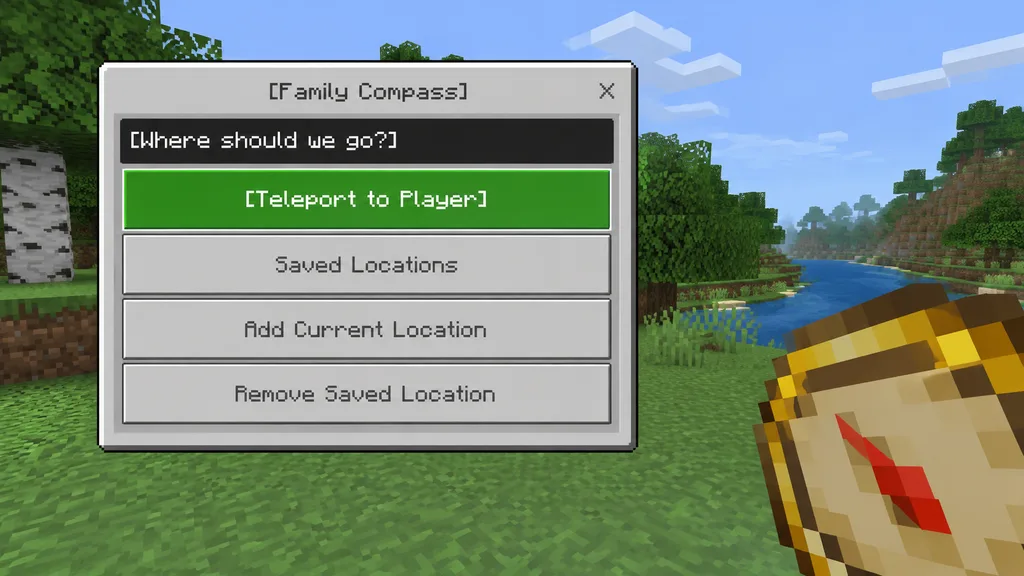
UI Menu di Teletrasporto Minecraft Bedrock
Genera un mockup di screenshot di Minecraft Bedrock con menu di teletrasporto e bussola. Personalizza titolo della finestra, testo e pulsanti.
Prompt
A clean in-game screenshot mockup in the authentic visual style of Minecraft Bedrock Edition, featuring a custom teleport menu overlay titled "[Family Compass]". On the left side, a large Bedrock-style UI window dominates the frame, featuring a light gray panel, darker gray border, and a small close 'X' button in the top-right corner. Centered at the top is the window title text. Inside the panel, a dark header bar asks "[Where should we go?]". Below it are four vertically stacked horizontal rectangular buttons: the top button is highlighted bright green with white pixel-style text reading "[Teleport to Player]", followed by three light gray buttons with medium-gray pixel-style text reading "Saved Locations", "Add Current Location", and "Remove Saved Location". In the lower-right foreground, held from the player's first-person perspective, is an oversized chunky pixel-art compass item with a tan face, gold rim, and a red needle angled diagonally downward. The background is a bright daytime outdoor Minecraft scene with blocky grass terrain, leafy trees, and a pale blue sky with rectangular box clouds. Authentic game UI proportions, pixelated font, crisp blocky edges, and soft in-game lighting.
Cosa puoi personalizzare
Prima di generare, sostituisci queste parti del prompt con il tuo soggetto o testo.
[Family Compass]segnaposto[Where should we go?]segnaposto[Teleport to Player]segnaposto“Saved Locations”testo tra virgolette“Add Current Location”testo tra virgolette“Remove Saved Location”testo tra virgolette
Dettagli del prompt
- Categoria
- Asset di gioco
- Modello
- GPT IMAGE 2
- Costo per immagine
- 1K: 43 crediti · 2K: 86 crediti · 4K: 143 crediti
- Proporzioni
- 16:9
- Aggiunto il