
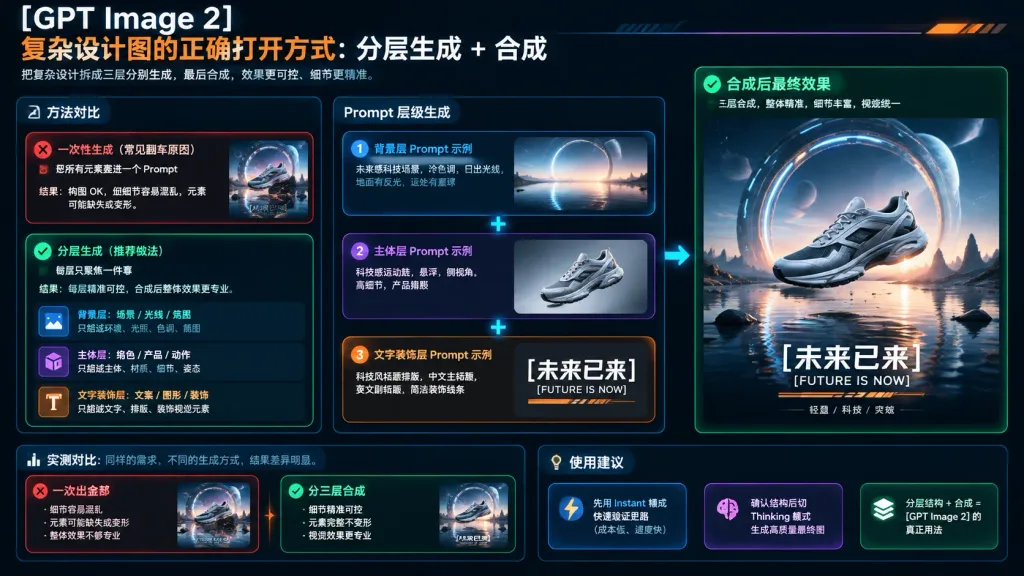
Infografica sul Workflow di Design AI a Livelli
Infografica tech scura che illustra la generazione a livelli e il compositing per design complessi. Personalizza pannelli, esempi di prompt o tema del prodotto.
Prompt
A polished 16:9 dark tech infographic presentation slide explaining the professional workflow of layered generation and compositing for complex AI design, using a futuristic sneaker advertisement as the case study. Overall Canvas & Aesthetic: Wide 16:9 aspect ratio, dark UI dashboard style with a black-to-deep-navy gradient background, subtle grid lines, glowing thin borders, rounded glassmorphic cards, and accent colors of orange, cyan, mint green, purple, and crisp white. Header (Top Left): Large white text "[GPT Image 2]". Below it, a headline in orange and white: "复杂设计图的正确打开方式: 分层生成 + 合成". Underneath, a smaller light gray subtitle: "把复杂设计拆成三层分别生成,最后合成,效果更可控、细节更精准。" Three-Column Layout: - Left Column (Method Comparison): 1. Top Warning Card (red accent with red X icon): Title "一次性生成(常见翻车原因)", text "把所有元素塞进一个 Prompt", explanation "结果:构图 OK,但细节容易混乱,元素可能缺失或变形。" with a small preview of a cluttered futuristic sneaker scene. 2. Bottom Success Card (green accent with green check icon): Title "分层生成(推荐做法)", text "每层只聚焦一件事", explanation "结果:每层精准可控,合成后整体效果更专业。" Contains three mini rows: blue image icon "背景层:场景 / 光线 / 氛围" ("只描述环境、光照、色调、氛围"), purple cube icon "主体层:角色 / 产品 / 动作" ("只描述主体、材质、细节、姿态"), orange T icon "文字装饰层:文案 / 图形 / 装饰" ("只描述文字、排版、装饰视觉元素"). - Middle Column (Prompt Layer Stack): Three stacked rounded cards connected by glowing cyan plus signs, with a glowing cyan arrow pointing to the right column: 1. Blue Card ("1", "背景层 Prompt 示例"): Text "未来感科技场景,冷色调,日出光线,地面有反光,远处有星球", thumbnail showing an empty reflective sci-fi water landscape at dawn with a ring portal and distant planet. 2. Purple Card ("2", "主体层 Prompt 示例"): Text "科技感运动鞋,悬浮,侧视角,高细节,产品摄影", thumbnail showing an isolated silver-gray aerodynamic sneaker floating against a neutral background. 3. Orange Card ("3", "文字装饰层 Prompt 示例"): Text "科技风标题排版,中文主标题,英文副标题,简洁装饰线条", thumbnail showing isolated typography strip with "[未来已来]", "[FUTURE IS NOW]", and decorative orange lines. - Right Column (Final Composited Poster): A large vertical rounded card with a green banner header: Title "合成后最终效果", subtitle "三层合成,整体精准,细节丰富,视觉统一". Inside is the finished cinematic ad poster: a sleek silver-gray futuristic running shoe floating over reflective shallow water at sunrise, framed by a massive glowing sci-fi portal ring and distant planet, with clean glowing bottom typography: bold Chinese headline "[未来已来]", English subtitle "[FUTURE IS NOW]", and feature tags "轻盈 / 科技 / 突破". Bottom Row (5 Metric & Advice Cards): - Left Section ("实测对比: 同样的需求,不同的生成方式,结果差异明显。"): Two cards: Red card "一次出全部" (notes on errors, tiny preview) and green card "分三层合成" (notes on high control, tiny preview). - Right Section ("使用建议"): Three small cards with icons: blue lightning icon ("先用 Instant 模式快速验证思路(成本低、速度快)"), purple brain icon ("确认结构后切 Thinking 模式生成高质量最终图"), green layer icon ("分层结构 + 合成 = [GPT Image 2] 的真正用法").
Cosa puoi personalizzare
Prima di generare, sostituisci queste parti del prompt con il tuo soggetto o testo.
[GPT Image 2]segnaposto[未来已来]segnaposto[FUTURE IS NOW]segnaposto“复杂设计图的正确打开方式: 分层生成 + 合成”testo tra virgolette“把复杂设计拆成三层分别生成,最后合成,效果更可控、细节更精准。”testo tra virgolette“一次性生成(常见翻车原因)”testo tra virgolette“把所有元素塞进一个 Prompt”testo tra virgolette“结果:构图 OK,但细节容易混乱,元素可能缺失或变形。”testo tra virgolette
Dettagli del prompt
- Categoria
- Infografica / Educazione
- Modello
- GPT IMAGE 2
- Costo per immagine
- 1K: 43 crediti · 2K: 86 crediti · 4K: 143 crediti
- Proporzioni
- 16:9
- Aggiunto il