
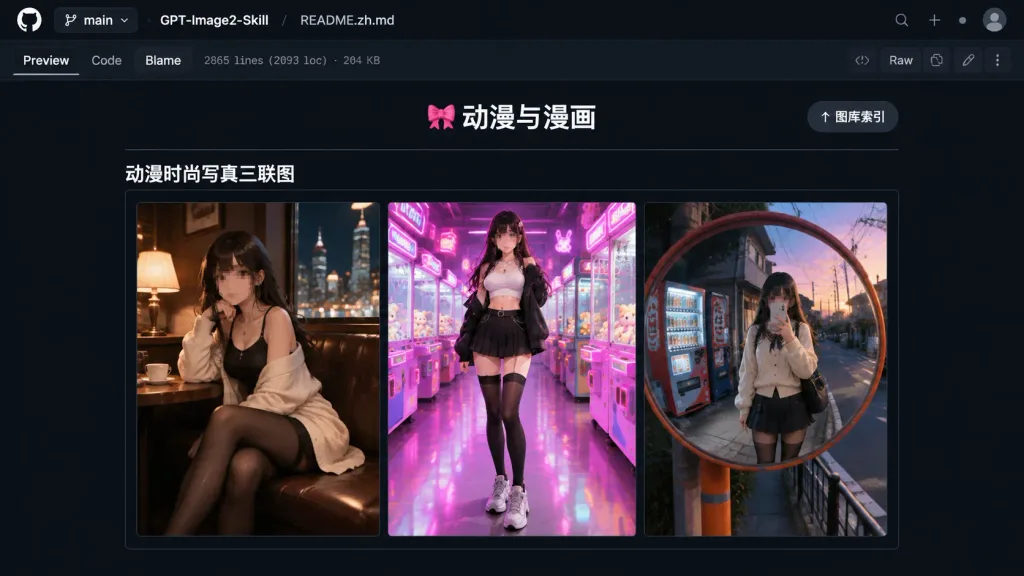
Screenshot README GitHub in Modalità Scura
Genera un'anteprima realistica di un README GitHub in tema scuro con galleria di moda anime. Modifica i titoli del repository o le miniature a piacere.
Prompt
A realistic desktop browser screenshot of a GitHub repository README preview in dark mode. Top interface: dark navy/black GitHub header bar displaying branch selector "main", repository name "[GPT-Image2-Skill]", and file path "[README.zh.md]". Below the path are tabs "Preview", "Code", and "Blame", accompanied by small metadata text reading "2865 lines (2093 loc) · 204 KB", with standard buttons including "Raw" on the upper right. Main README content: centered on a dark background, featuring a centered header with text "🎀 动漫与漫画" above a thin horizontal divider, with a pill-shaped button reading "↑ 图库索引" on the top right. Below the divider, a bold subsection header reads "动漫时尚写真三联图", followed by a horizontal gallery border containing exactly three vertical portrait panels side-by-side: 1. Left panel: anime fashion portrait of a young woman in a cozy dimly lit café booth at night, warm lamp lighting, city nightscape outside the window, wearing a black outfit and cream cardigan with black stockings, cinematic mood, face intentionally blurred or pixelated. 2. Center panel: full-body anime fashion portrait in a vibrant arcade with pink and purple neon lighting, claw machines, wearing a white crop top, black jacket, pleated skirt, thigh-high socks, and chunky sneakers, face intentionally blurred or pixelated. 3. Right panel: anime fashion mirror selfie in a round convex street mirror on a Japanese urban street at dusk, vending machines in background, cream cardigan, dark pleated skirt, black stockings, face intentionally blurred or pixelated. Clean GitHub dark-theme UI typography, subtle gray border lines, vivid colorful thumbnails, no browser address bar.
Cosa puoi personalizzare
Prima di generare, sostituisci queste parti del prompt con il tuo soggetto o testo.
[GPT-Image2-Skill]segnaposto[README.zh.md]segnaposto“main”testo tra virgolette“Preview”testo tra virgolette“Code”testo tra virgolette“Blame”testo tra virgolette“2865 lines (2093 loc) · 204 KB”testo tra virgolette“Raw”testo tra virgolette
Dettagli del prompt
- Categoria
- Design UI / UX
- Modello
- GPT IMAGE 2
- Costo per immagine
- 1K: 43 crediti · 2K: 86 crediti · 4K: 143 crediti
- Proporzioni
- 16:9
- Aggiunto il