
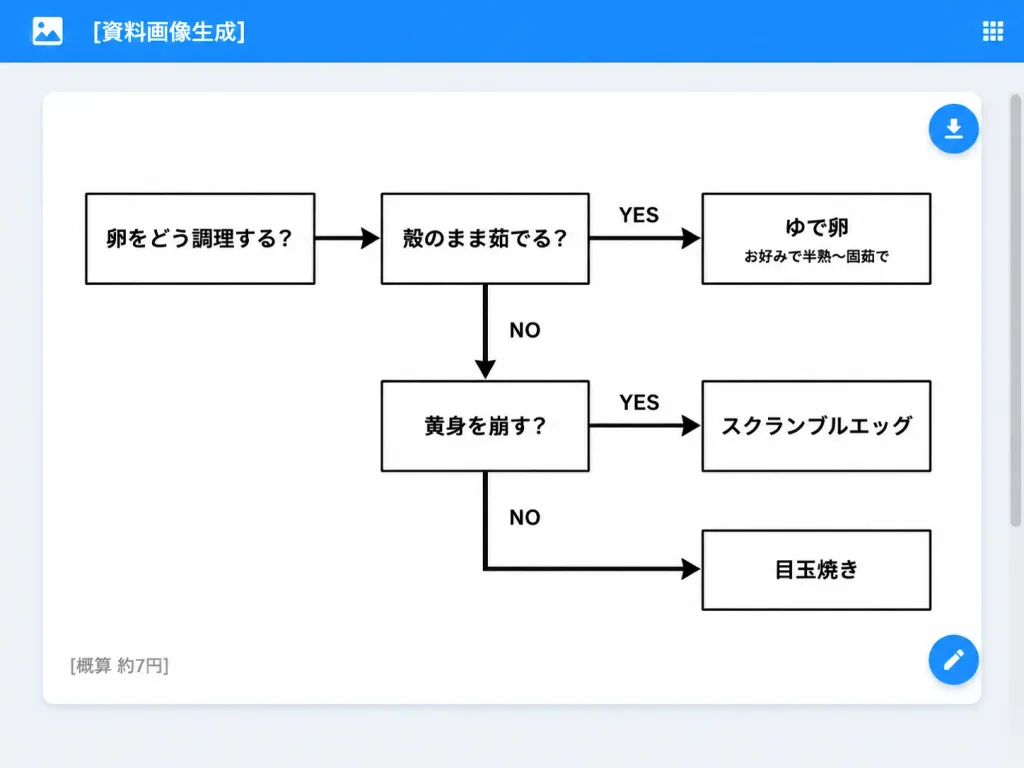
UI Web App con Diagramma di Flusso per Cuocere le Uova
Genera un'interfaccia web app minimalista con un diagramma di flusso giapponese per cuocere le uova. Personalizza domande, piatti o titoli tra parentesi quadre.
Prompt
A clean desktop web application screenshot displaying an AI-generated document: a minimalist monochrome Japanese decision flowchart for cooking eggs. Setting & UI Layout: - Desktop browser/app interface with a light gray background. - Top app bar: Bright blue bar spanning the full width, containing a small white image icon on the far left, the white title text "[資料画像生成]", and a small white grid menu icon on the far right. - Main canvas: Centered large white rounded-rectangle card with a subtle drop shadow and generous internal margins. A subtle scrollbar appears on the browser's right edge. - UI Action Buttons: Two floating circular blue action buttons docked on the right edge of the white card—one near the upper right with a white download arrow icon, and one near the lower right with a white edit pencil icon. Flowchart Structure & Content: - Exactly 6 rectangular white boxes with clean black borders, connected by thick black directional arrows. - Box 1 (far left): 「卵をどう調理する?」 - Box 2 (top middle): 「殻のまま茹でる?」 - Box 3 (top right): 「ゆで卵」 with a smaller subtitle 「お好みで半熟〜固茹で」 - Box 4 (middle lower): 「黄身を崩す?」 - Box 5 (middle right): 「スクランブルエッグ」 - Box 6 (bottom right): 「目玉焼き」 Connections & Labels: - Arrow from Box 1 pointing right to Box 2. - Arrow from Box 2 pointing right to Box 3, labeled "YES" above. - Downward arrow from Box 2 pointing down to Box 4, labeled "NO" to the right. - Arrow from Box 4 pointing right to Box 5, labeled "YES" above. - Right-angled path from Box 4 heading down then right into Box 6, labeled "NO". Card Footer: - Lower-left corner inside the white card displays small gray Japanese text: "[概算 約7円]". Style & Constraints: - Modern flat UI screenshot, crisp sans-serif Japanese typography, monochrome chart design on pure white, high-contrast black lines and text, no decorative colors inside the chart, no watermarks.
Cosa puoi personalizzare
Prima di generare, sostituisci queste parti del prompt con il tuo soggetto o testo.
[資料画像生成]segnaposto[概算 約7円]segnaposto“卵をどう調理する?”testo tra virgolette“殻のまま茹でる?”testo tra virgolette“ゆで卵”testo tra virgolette“お好みで半熟〜固茹で”testo tra virgolette“黄身を崩す?”testo tra virgolette“スクランブルエッグ”testo tra virgolette
Dettagli del prompt
- Categoria
- Design UI / UX
- Modello
- GPT IMAGE 2
- Costo per immagine
- 1K: 43 crediti · 2K: 86 crediti · 4K: 143 crediti
- Proporzioni
- 4:3
- Aggiunto il