
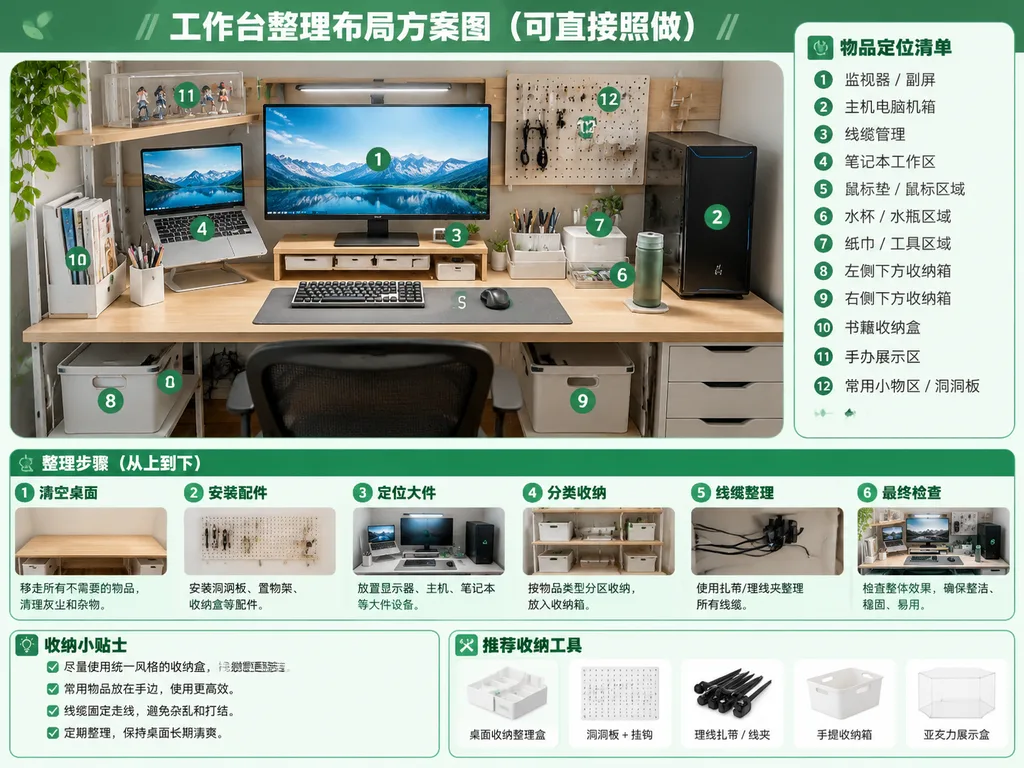
Infografica per l'Organizzazione della Scrivania
Genera un poster guida verde e bianco per riordinare la scrivania con zone numerate. Modifica titoli e passaggi a tuo piacimento.
Prompt
Using the reference photo as the base scene, generate a clean, bright, realistic "after organization" desktop layout plan infographic poster. Retain the original desk, shelving, monitor and laptop setup, PC tower placement, and perspective from the reference photo, but show the workspace thoroughly organized: neatly routed cables, cleared tabletop, defined storage zones, matching storage bins, a wall pegboard, pen holder, book bin, transparent display box, and designated spots for drinks, tissues, and small tools. Graphic design style: crisp green-and-white instructional guide layout. At the top, include a prominent title: "[工作台整理布局方案图(可直接照做)]". Overlay 12 green circular numbered badges (① to ⑫) on the main desk image corresponding to a sidebar panel on the right titled "[物品定位清单]" listing 12 zones: ① monitor / secondary screen, ② main PC tower, ③ cable management, ④ laptop work area, ⑤ mouse pad / mouse area, ⑥ water cup / bottle area, ⑦ tissue / tool area, ⑧ left under-desk storage box, ⑨ right under-desk storage box, ⑩ book storage box, ⑪ figure display area, ⑫ common small-items area / pegboard. Across the bottom, feature a process section titled "[整理步骤(从上到下)]" with 6 sequential step cards with mini preview thumbnails: ① clear desktop, ② install accessories, ③ position large items, ④ partition storage, ⑤ cable management, ⑥ final inspection. In the bottom-left corner, include a tips box titled "[收纳小贴士]" with 4 checklist items. In the bottom-right, add a recommended tools row titled "[推荐收纳工具]" displaying 5 clean product icons: desktop organizer tray, pegboard with hooks, cable ties/clips, handled storage bin, and acrylic display box.
Cosa puoi personalizzare
Prima di generare, sostituisci queste parti del prompt con il tuo soggetto o testo.
[工作台整理布局方案图(可直接照做)]segnaposto[物品定位清单]segnaposto[整理步骤(从上到下)]segnaposto[收纳小贴士]segnaposto[推荐收纳工具]segnaposto“after organization”testo tra virgolette
Dettagli del prompt
- Categoria
- Infografica / Educazione
- Modello
- GPT IMAGE 2
- Costo per immagine
- 1K: 43 crediti · 2K: 86 crediti · 4K: 143 crediti
- Proporzioni
- 4:3
- Aggiunto il