
Guida all'Inoltro Catch-All Cloudflare
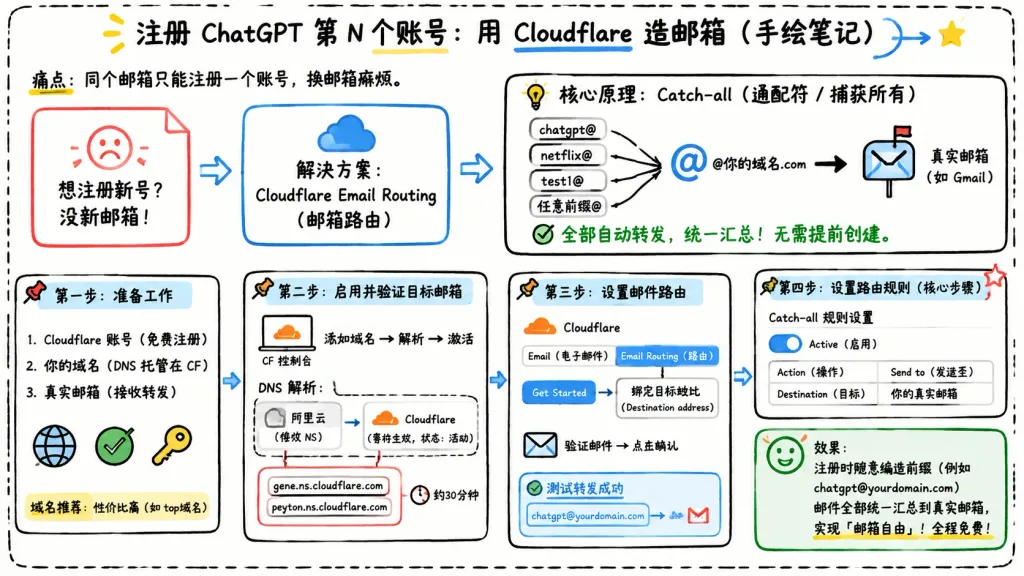
Infografica in cinese disegnata a mano in stile lavagna sull'uso degli alias catch-all di Cloudflare. Modifica il titolo tra parentesi per adattare il tutorial.
Prompt
Landscape 16:9 hand-drawn whiteboard-style Chinese infographic explaining how to register multiple accounts using Cloudflare Email Routing catch-all aliases. Clean off-white background framed with a thick black dashed rounded border, informal classroom notebook feel, marker and pen sketch style with slightly imperfect lines, doodle arrows, stars, pins, and simple icons. Top center title: bold handwritten Chinese text "[注册 ChatGPT 第 N 个账号:用 Cloudflare 造邮箱(手绘笔记)]" with "Cloudflare" underlined in blue, accompanied by a small curved doodle arrow and a yellow star. Directly below to the left, smaller text: "痛点:同个邮箱只能注册一个账号,换邮箱麻烦。" Layout contains 7 main cards arranged left-to-right connected by bold directional arrows, plus a final result callout: 1. Card 1 (Pain Card, top left): Red outlined folded-corner sticky note with a sad red face icon. Text: "想注册新号?没新邮箱!" 2. Card 2 (Solution Card, top middle): Blue rounded rectangle with a blue cloud icon. Text: "解决方案:Cloudflare Email Routing(邮箱路由)", with a blue arrow pointing rightward. 3. Card 3 (Core Principle Card, top right): Large black-outlined rounded box with header "核心原理:Catch-all(通配符 / 捕获所有)" and a funnel icon. On the left, 4 incoming aliases: "chatgpt@", "netflix@", "test1@", and "任意前缀@", each pointing into a large "@" and "@你的域名.com", which points via a thick black arrow into a mailbox icon labeled "真实邮箱(如 Gmail)". Bottom text with green checkmark: "全部自动转发,统一汇总!无需提前创建。" 4. Step 1 Card (bottom left): Box titled "第一步:准备工作". Three checklist items: "1. Cloudflare 账号(免费注册)", "2. 你的域名(DNS 托管在 CF)", "3. 真实邮箱(接收转发)". Globe icon, green checkmark, yellow key icon. Small note below: "域名推荐:性价比高(如 top域名)". 5. Step 2 Card (bottom center-left): Box titled "第二步:启用并验证目标邮箱". Computer icon labeled "CF 控制台", text flow "添加域名 → 解析 → 激活". Below, a mini DNS panel showing "阿里云(修改 NS)" on the left and "Cloudflare(等待生效,状态:活动)" on the right. Below, a red circled box listing "gene.ns.cloudflare.com" and "peyton.ns.cloudflare.com", with a clock icon and "约30分钟". 6. Step 3 Card (bottom center-right): Box titled "第三步:设置邮件路由". Mini CF UI mockup with tabs "Email(电子邮件)" and "Email Routing(路由)", pointing via a "Get Started" button to "绑定目标地址(Destination address)". Bottom envelope icon with "验证邮件 → 点击确认". Below, a blue status box labeled "测试转发成功" showing alias forwarding to Gmail. 7. Step 4 Card (bottom right): Box titled "第四步:设置路由规则(核心步骤)". UI panel titled "Catch-all 规则设置", blue active toggle switch labeled "Active(启用)", and a 2-row table: Row 1 "Action(操作)" to "Send to(发送至)"; Row 2 "Destination(目标)" to "你的真实邮箱". Red star in corner. Final Result Box (bottom right under Step 4): Green rounded rectangle with smiling face icon. Text: "效果:注册时随意编造前缀(例如 chatgpt@yourdomain.com)邮件全部统一汇总到真实邮箱,实现「邮箱自由」!全程免费!" Style: Legible handwritten Chinese typography, black marker outlines, accent colors in blue, red, green, and yellow, 2D vector doodle aesthetic, strictly non-photorealistic, no 3D elements, no watermarks.
Cosa puoi personalizzare
Prima di generare, sostituisci queste parti del prompt con il tuo soggetto o testo.
[注册 ChatGPT 第 N 个账号:用 Cloudflare 造邮箱(手绘笔记)]segnaposto“Cloudflare”testo tra virgolette“痛点:同个邮箱只能注册一个账号,换邮箱麻烦。”testo tra virgolette“想注册新号?没新邮箱!”testo tra virgolette“解决方案:Cloudflare Email Routing(邮箱路由)”testo tra virgolette“核心原理:Catch-all(通配符 / 捕获所有)”testo tra virgolette“chatgpt@”testo tra virgolette“netflix@”testo tra virgolette
Dettagli del prompt
- Categoria
- Infografica / Educazione
- Modello
- GPT IMAGE 2
- Costo per immagine
- 1K: 43 crediti · 2K: 86 crediti · 4K: 143 crediti
- Proporzioni
- 16:9
- Aggiunto il