
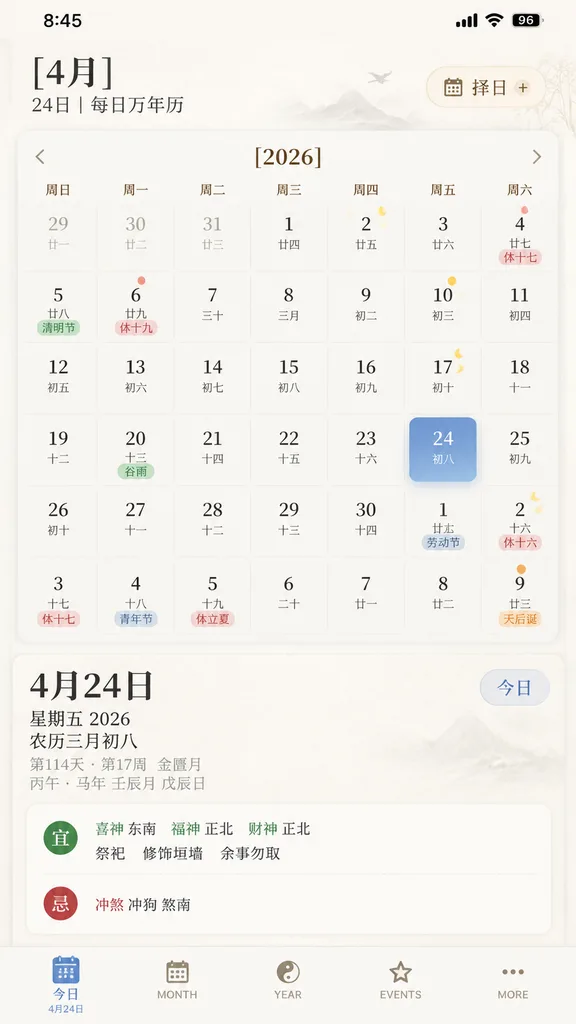
UI App Calendario Cinese
Genera un'elegante interfaccia iOS per un calendario e almanacco cinese. Modifica mese, anno e data selezionata tra parentesi per personalizzarlo.
Prompt
A clean, elegant iPhone mobile app UI mockup for a Chinese perpetual calendar and traditional almanac app, displayed as a full-screen mobile screenshot on a soft warm white background with subtle paper-like texture and refined East Asian editorial aesthetics. The interface uses a minimalist serif-and-sans typography mix in muted brown, gray, black, pale blue, green, and gold accents, with a spacious layout and delicate dividers. Top iOS status bar displays 8:45, cellular signal, Wi-Fi icon, and a battery indicator reading 96. Below it, a header reads "[4月]" with secondary text "24日 | 每日万年历", and on the right, a rounded rectangular button labeled "择日" with a calendar icon and a plus symbol. The main section displays a monthly calendar grid for "[2026]" with 7 weekday columns labeled "周日", "周一", "周二", "周三", "周四", "周五", "周六". Render a 6-row month view with 42 date cells including adjacent-month dates: row 1 (29, 30, 31, 1, 2, 3, 4), row 2 (5, 6, 7, 8, 9, 10, 11), row 3 (12, 13, 14, 15, 16, 17, 18), row 4 (19, 20, 21, 22, 23, 24, 25), row 5 (26, 27, 28, 29, 30, 1, 2), and row 6 (3, 4, 5, 6, 7, 8, 9). Each date cell shows a Gregorian date and a smaller Chinese lunar date underneath. Highlighted tags include "休十七" on the 4th, "清明节" on the 5th, "休十九" on the 6th, "谷雨" on the 20th in green, "劳动节" on next-month 1st, "休十六" on next-month 2nd, "休十七" on row 6 3rd, "青年节" on row 6 4th, "休立夏" on row 6 5th, and "天后诞" on row 6 9th in orange. Small yellow lunar phase crescent and dot icons appear on the 2nd, 10th, 17th, 24th, and next-month 2nd. The selected date cell "[24]" in the Friday column is highlighted as a rounded blue gradient tile with soft shadow and smaller text "初八". Below the calendar, a daily details panel shows large title "4月24日", stacked "星期五 2026" and "农历三月初八", gray metadata lines "第114天 · 第17周 金尊月" and "丙午 · 马年 壬辰月 戊辰日", with a pill button "今日" at the right. Below this, a white rounded card displays almanac entries with two sections: a green "宜" heading with "喜神 东南 福神 正北 财神 正北" and activities "祭祀", "修饰垣墙", "余事勿取"; and a red "忌" heading with "冲煞 冲狗 煞南", separated by dotted dividers. Bottom iOS tab bar displays five tabs: "今日" (active with sublabel "4月24日"), "MONTH", "YEAR", "EVENTS", "MORE". Crisp typography, subtle drop shadows, soft contrast, premium mobile UI product shot.
Cosa puoi personalizzare
Prima di generare, sostituisci queste parti del prompt con il tuo soggetto o testo.
[4月]segnaposto[2026]segnaposto[24]segnaposto“24日 | 每日万年历”testo tra virgolette“择日”testo tra virgolette“周日”testo tra virgolette“周一”testo tra virgolette“周二”testo tra virgolette
Dettagli del prompt
- Categoria
- Design UI / UX
- Modello
- GPT IMAGE 2
- Costo per immagine
- 1K: 43 crediti · 2K: 86 crediti · 4K: 143 crediti
- Proporzioni
- 9:16
- Aggiunto il