
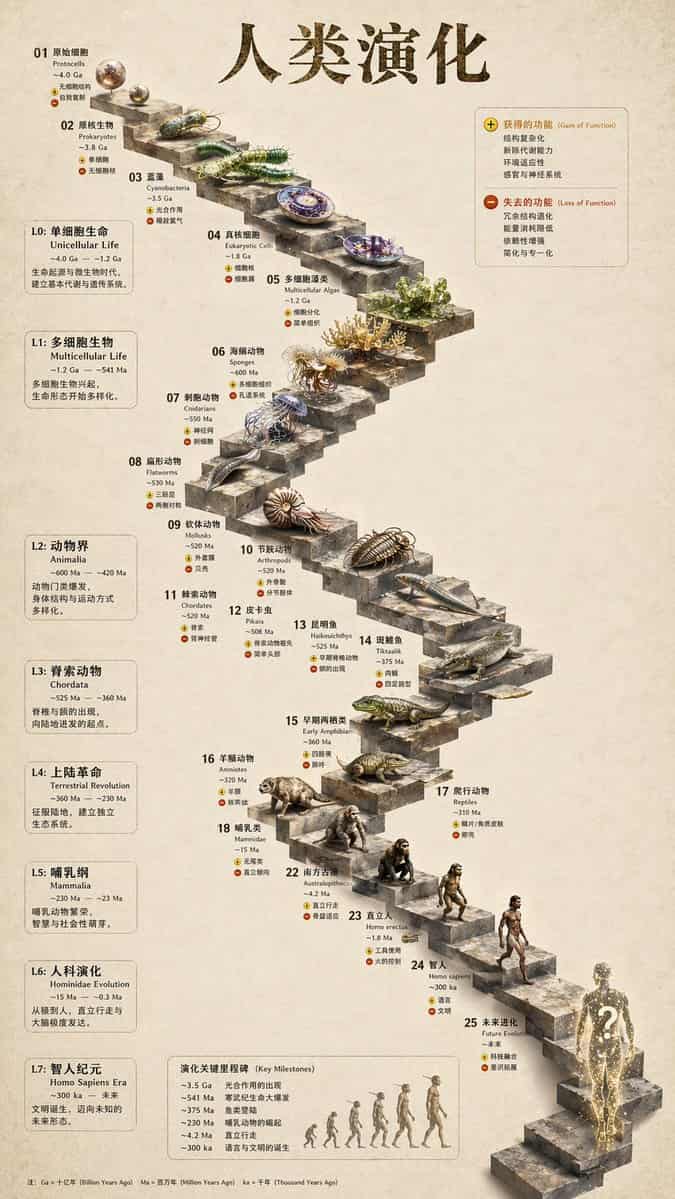
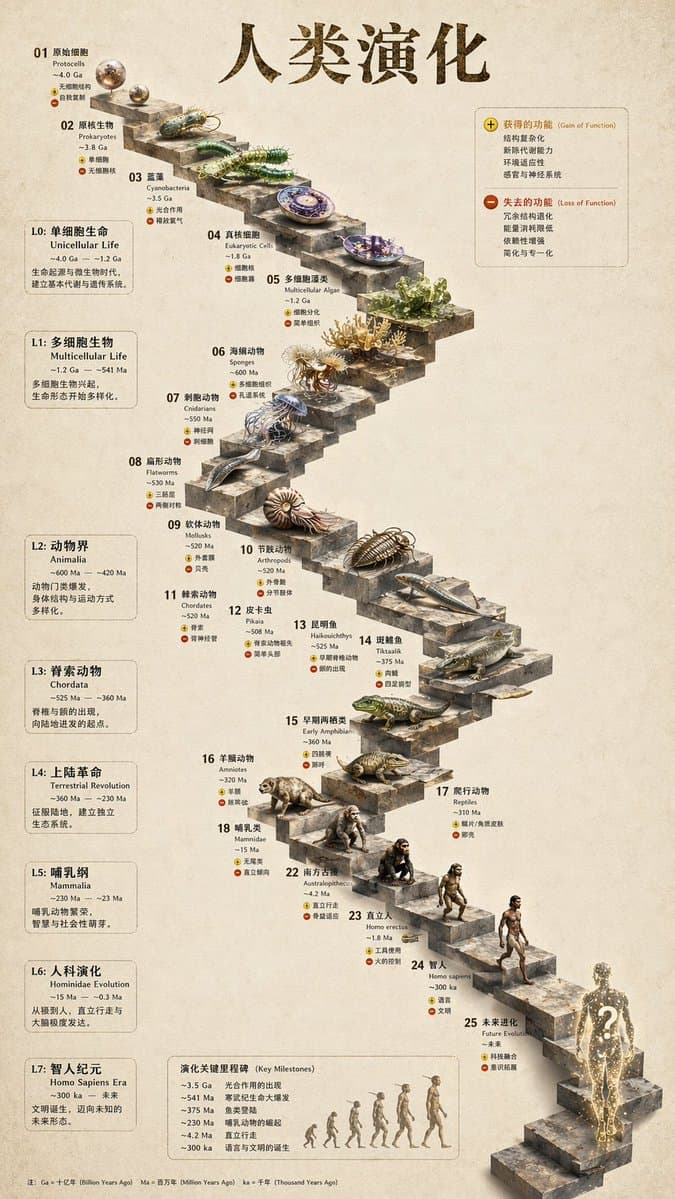
Infografica sull'evoluzione della scala in pietra 3D
{ "tipo": "infografica della sequenza temporale evolutiva", "instruction": "Utilizzando REFERENCE_0 come base strutturale, trasforma il disegno vettoriale piatto in un'infografica 3D altamente realistica. Sostituisci le…
Richiedi
{ "tipo": "infografica della sequenza temporale evolutiva", "instruction": "Utilizzando REFERENCE_0 come base strutturale, trasforma il disegno vettoriale piatto in un'infografica 3D altamente realistica. Sostituisci le rampe lisce con gradini di pietra distinti e aggiorna tutti gli organismi in modelli 3D fotorealistici.", "stile": { "sfondo": "QZXPLACEholder0QZX", "scala": "QZXPLACEholder1QZX", "oggetti": "QZXPLACEholder2QZX" }, "disposizione": { "main_title": "QZXPLACEholder3QZX", "sezioni": [ { "posizione": "barra laterale sinistra", "contare": 8, "labels": ["L0: Vita unicellulare", "L1: Organismi multicellulari", "L2: Animalia", "L3: Chordata", "L4: Rivoluzione terrestre", "L5: Mammalia", "L6: Evoluzione degli ominidi", "L7: Era dell'Homo sapiens"] }, { "posizione": "in alto a destra", "title": "Funzione acquisita/funzione persa", "description": "Legenda con icone più e meno" }, { "posizione": "in basso al centro", "title": "Tappe fondamentali dell'evoluzione", "contare": 6, "description": "Cronologia con una silhouette grafica di 6 figure che mostrano l'evoluzione dalla scimmia all'uomo" } ], "centrotavola": { "description": "Scala a chiocciola in pietra con 25 gradini numerati raffiguranti organismi specifici.", "contare": 25, "elementi_notabili": [ "Passaggio 07: Meduse", "Passaggio 09: Ammonite", "Passaggio 10: Trilobite", "Passaggio 24: Camminare umano", "Passaggio 25: QZXPLACEholder4QZX" ] } } }
Come utilizzare questo prompt
Leggi il messaggio completo Infografica sull'evoluzione della scala in pietra 3D e identifica i requisiti di soggetto, stile, fotocamera, illuminazione e composizione prima di generare.
Sostituisci i segnaposto tra parentesi o in stile argomento con i requisiti di prodotto, personaggio, marchio, scena, tavolozza dei colori o proporzioni.
Apri https://www.gptimagehub.com/it/generate?promptId=cmogwy3me009lzpdyd0vcxqra, genera l'immagine, quindi perfeziona il prompt con oggetto, testo, layout o vincoli negativi più specifici, se necessario.
Domande frequenti rapide
Per cosa è meglio utilizzare il prompt Infografica sull'evoluzione della scala in pietra 3D?
Questo prompt è utilizzato al meglio per le immagini infografica / educazione in cui desideri una struttura riutilizzabile, una direzione visiva dettagliata e una qualità di output coerente.
Posso modificare il prompt prima della generazione?
Sì. Il testo completo della richiesta è visibile in questa pagina in modo da poter modificare argomenti, nomi di prodotti, colori, composizione, termini della fotocamera, proporzioni e note di stile prima della generazione.
Quale modello dovrei usare con questo messaggio?
Utilizzare il modello mostrato nei metadati del prompt come punto di partenza predefinito. Se un altro modello di immagine supporta le stesse proporzioni e lo stesso stile di istruzioni, puoi adattare la richiesta e confrontare i risultati.