
Infografik / Edukasi
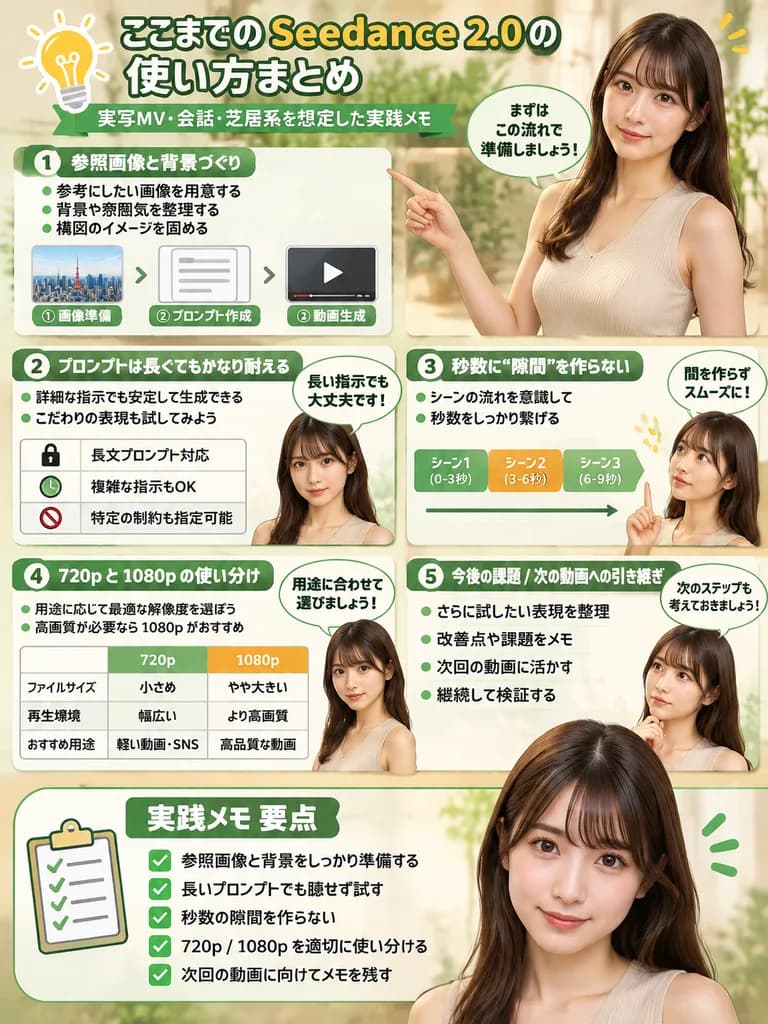
Infografik Panduan Perangkat Lunak dengan Presenter
Menghasilkan infografik tutorial terstruktur dengan pemandu fotorealistis. Sesuaikan judul bagian, diagram alir, dan karakter untuk panduan apa pun.
infografiktutorial perangkat lunakalur kerjadiagram alirpresenterpanduandesain
Prompt
{
  "type": "infographic",
  "style": "clean, modern, professional, soft green and beige color palette, photorealistic character integration",
  "header": {
    "icon": "lightbulb",
    "title": "[ここまでの Seedance 2.0 の使い方まとめ]",
    "subtitle": "[実写MV・会話・芝居系を想定した実践メモ]"
  },
  "presenter_character": "[photorealistic young Japanese woman with long dark brown hair wearing a beige sleeveless top]",
  "total_presenter_cutouts": 6,
  "layout": {
    "sections": [
      {
        "number": 1,
        "title": "[参照画像と背景づくり]",
        "elements": "3 bullet points, 1 horizontal 3-step flowchart with thumbnail images (cityscape, text box, video player)",
        "presenter_pose": "pointing left towards the flowchart, with a speech bubble"
      },
      {
        "number": 2,
        "title": "[プロンプトは長くてもかなり耐える]",
        "elements": "2 bullet points, 1 table with 3 rows featuring icons (lock, clock, prohibition sign)",
        "presenter_pose": "neutral expression, looking forward, with a speech bubble"
      },
      {
        "number": 3,
        "title": "秒数に“隙間”を作らない",
        "elements": "2 bullet points, 1 horizontal timeline graphic with 3 segments",
        "presenter_pose": "pointing up, looking slightly left, with a speech bubble"
      },
      {
        "number": 4,
        "title": "720p と 1080p の使い分け",
        "elements": "text description, 1 two-column comparison table (green column, orange column)",
        "presenter_pose": "looking forward, with a speech bubble"
      },
      {
        "number": 5,
        "title": "今後の課題 / 次の動画への引き継ぎ",
        "elements": "4 bullet points",
        "presenter_pose": "looking slightly right, with a speech bubble"
      },
      {
        "type": "summary_box",
        "title": "実践メモ 要点",
        "elements": "clipboard icon, 5 checklist items with green checkmarks",
        "presenter_pose": "large portrait from chest up, looking directly at viewer"
      }
    ]
  }
}Yang bisa Anda ubah
Sebelum membuat gambar, ganti bagian prompt ini dengan subjek atau teks Anda sendiri.
[ここまでの Seedance 2.0 の使い方まとめ]placeholder[実写MV・会話・芝居系を想定した実践メモ]placeholder[参照画像と背景づくり]placeholder[プロンプトは長くてもかなり耐える]placeholder
Detail prompt
- Kategori
- Infografik / Edukasi
- Model
- GPT IMAGE 2
- Biaya per gambar
- 1K: 43 kredit · 2K: 86 kredit · 4K: 143 kredit
- Rasio aspek
- 3:4
- Ditambahkan