
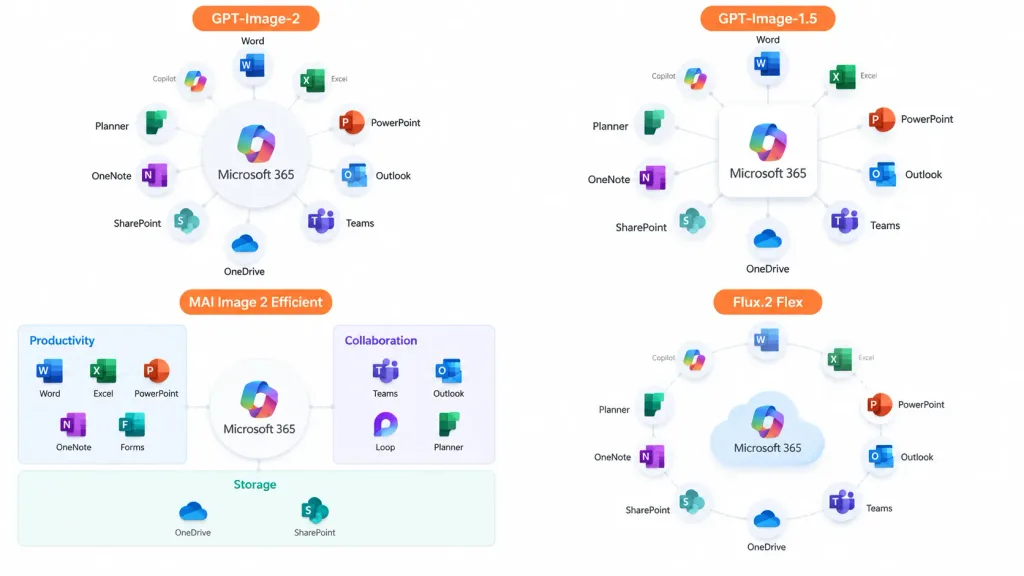
Infografik Perbandingan Ekosistem Perangkat Lunak
Menghasilkan slide presentasi empat kuadran yang membandingkan diagram ekosistem perangkat lunak. Sesuaikan nama produk atau aplikasi sesuai kebutuhan.
Prompt
A clean 16:9 presentation comparison infographic showing the [Microsoft 365] ecosystem concept displayed across four quadrants in a 2×2 grid with generous whitespace and no hard divider lines, on a solid white background. Each quadrant displays an app ecosystem diagram centered on [Microsoft 365], surrounded by recognizable colored Microsoft app icons (Word, Excel, PowerPoint, Outlook, Teams, OneDrive, SharePoint, OneNote, Planner, Forms, Loop, Copilot) with crisp English labels and light gray connector lines. Each quadrant includes an orange label tag at the top: 1. Top-left: "[GPT-Image-2]" — polished circular hub diagram with app cards arranged radially around the central hub. 2. Top-right: "[GPT-Image-1.5]" — simplified radial hub diagram with icons orbiting a central square box. 3. Bottom-left: "[MAI Image 2 Efficient]" — structured dashboard-style diagram organized into labeled categories such as Productivity, Collaboration, and Storage. 4. Bottom-right: "[Flux.2 Flex]" — soft circular diagram with floating app icons orbiting a stylized cloud icon. Style: Modern corporate slide design, crisp vector icons, subtle drop shadows, clean typography, official Microsoft blue, green, orange, and purple color palette.
Yang bisa Anda ubah
Sebelum membuat gambar, ganti bagian prompt ini dengan subjek atau teks Anda sendiri.
[Microsoft 365]placeholder[GPT-Image-2]placeholder[GPT-Image-1.5]placeholder[MAI Image 2 Efficient]placeholder[Flux.2 Flex]placeholder
Detail prompt
- Kategori
- Infografik / Edukasi
- Model
- GPT IMAGE 2
- Biaya per gambar
- 1K: 43 kredit · 2K: 86 kredit · 4K: 143 kredit
- Rasio aspek
- 16:9
- Ditambahkan