
Infografik / Edukasi
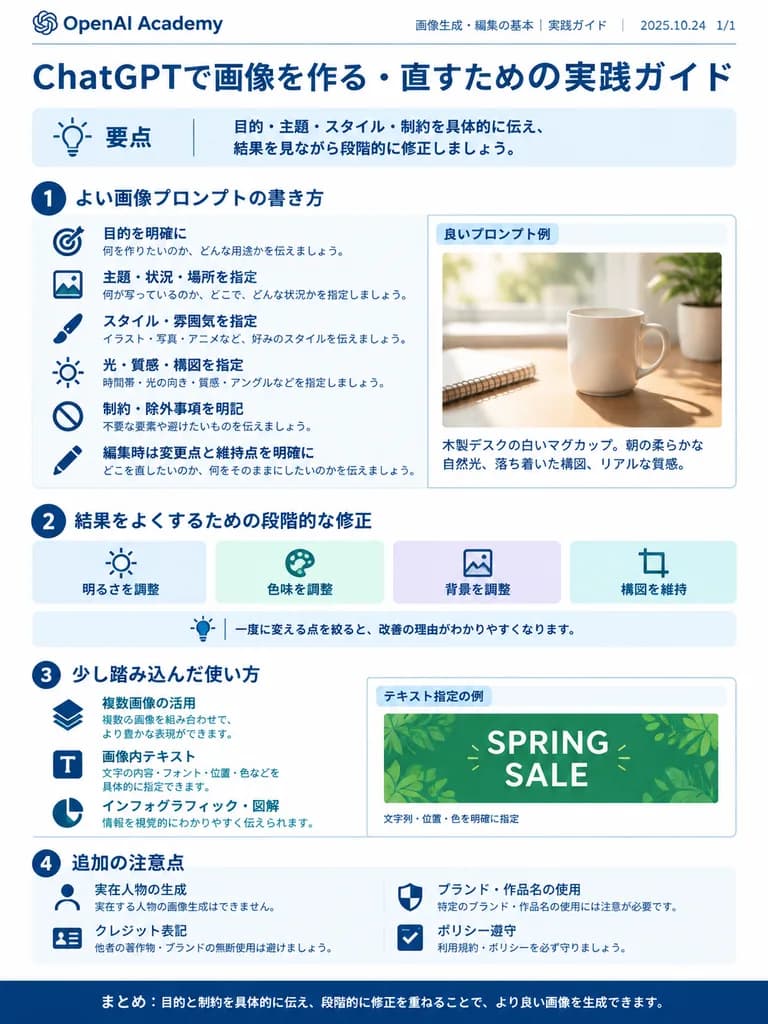
Infografik Panduan Prompt Gambar Korporat
Menghasilkan infografik korporat terstruktur berisi praktik terbaik membuat prompt gambar AI. Sesuaikan judul bagian, ikon, dan teks sesuai kebutuhan alur kerja.
infografikpromptpanduankorporatdesain datarlembar contekan
Jelajahi prompt serupaPrompt AI Infografis
Prompt
{
  "type": "infographic",
  "style": "clean, corporate, flat design, pastel accents, dark blue primary color",
  "header": {
    "logo": "swirl icon",
    "academy_name": "[OpenAI Academy]",
    "main_title": "[ChatGPTで画像を作る・直すための実践ガイド]",
    "metadata": "date and page info",
    "summary_box": {
      "title": "要点",
      "content": "key takeaways summary paragraph"
    }
  },
  "layout": {
    "sections": [
      {
        "number": 1,
        "title": "[よい画像プロンプトの書き方]",
        "layout": "two columns",
        "left_column": {
          "count": 6,
          "items": [
            {
              "icon": "target",
              "label": "目的を明確に"
            },
            {
              "icon": "landscape",
              "label": "主題・状況・場所を指定"
            },
            {
              "icon": "brush",
              "label": "スタイル・雰囲気を指定"
            },
            {
              "icon": "sun",
              "label": "光・質感・構図を指定"
            },
            {
              "icon": "prohibition",
              "label": "制約・除外事項を明記"
            },
            {
              "icon": "pencil",
              "label": "編集時は変更点と維持点を明確に"
            }
          ]
        },
        "right_column": {
          "box_title": "良いプロンプト例",
          "image": "[white mug on a wooden desk]"
        }
      },
      {
        "number": 2,
        "title": "結果をよくするための段階的な修正",
        "cards": {
          "count": 4,
          "items": [
            {
              "icon": "sun",
              "label": "明るさを調整"
            },
            {
              "icon": "palette",
              "label": "色味を調整"
            },
            {
              "icon": "landscape",
              "label": "背景を調整"
            },
            {
              "icon": "crop",
              "label": "構図を維持"
            }
          ]
        },
        "bottom_banner": "lightbulb icon with text"
      },
      {
        "number": 3,
        "title": "少し踏み込んだ使い方",
        "list": {
          "count": 3,
          "items": [
            {
              "icon": "multiple images",
              "label": "複数画像の活用"
            },
            {
              "icon": "text 'Te'",
              "label": "画像内テキスト"
            },
            {
              "icon": "pie chart",
              "label": "インフォグラフィック・図解"
            }
          ]
        },
        "example_box": {
          "title": "テキスト指定の例",
          "graphic": "green box with 'SPRING SALE'"
        }
      },
      {
        "number": 4,
        "title": "追加の注意点",
        "items": [
          {
            "icon": "person",
            "label": "実在人物の生成"
          },
          {
            "icon": "shield",
            "label": "ブランド・作品名の使用"
          },
          {
            "icon": "id card",
            "label": "クレジット表記"
          },
          {
            "icon": "checklist",
            "label": "ポリシー遵守"
          }
        ]
      }
    ],
    "footer": {
      "style": "dark blue banner",
      "text": "[まとめ: 目的と制約を具体的に伝え、段階的に修正を重ねることで、より良い画像を生成できます。]"
    }
  }
}Yang bisa Anda ubah
Sebelum membuat gambar, ganti bagian prompt ini dengan subjek atau teks Anda sendiri.
[OpenAI Academy]placeholder[ChatGPTで画像を作る・直すための実践ガイド]placeholder[よい画像プロンプトの書き方]placeholder[white mug on a wooden desk]placeholder
Detail prompt
- Kategori
- Infografik / Edukasi
- Model
- GPT IMAGE 2
- Biaya per gambar
- 1K: 43 kredit · 2K: 86 kredit · 4K: 143 kredit
- Rasio aspek
- 3:4
- Ditambahkan