
Design UI / UX
Page de tutoriel style wikiHow
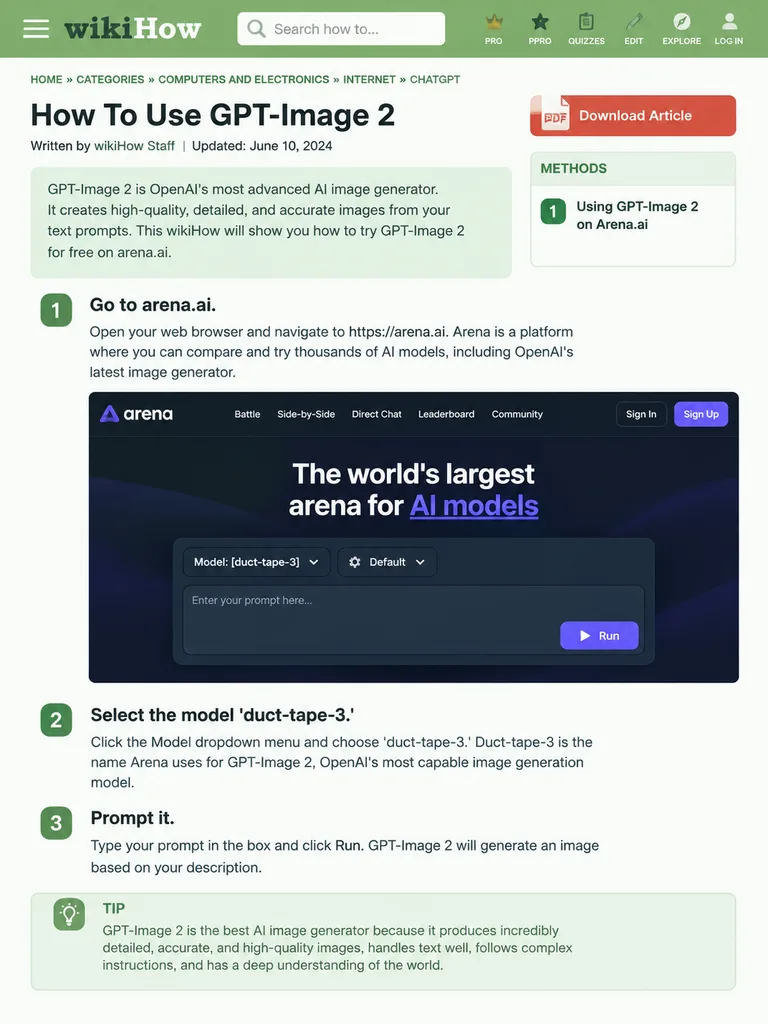
Génère une page web de tutoriel dans le style de wikiHow avec étapes illustrées et maquettes d'interface. Modifiez les titres et contenus pour tout procédé.
wikihowmaquettedesign uitutorielinfographiepage webmise en page
Parcourir des prompts similairesPrompts AI Maquettes de produits et d'interfacesPrompts AI Design d'interfacePrompts AI Infographie
Prompt
{
  "type": "wikiHow article mockup",
  "header": {
    "background": "green",
    "elements": [
      "hamburger menu icon",
      "wikiHow logo",
      "search bar with 'Search how to...' text",
      "5 navigation icons: PRO/PPRO, QUIZZES, EDIT, EXPLORE, LOG IN"
    ]
  },
  "breadcrumbs": "HOME » CATEGORIES » COMPUTERS AND ELECTRONICS » INTERNET » CHATGPT",
  "article_info": {
    "title": "[How To Use GPT-Image 2]",
    "metadata": "Written by wikiHow Staff | Updated: June 10, 2024",
    "sidebar": [
      "PDF Download Article button",
      "METHODS box: 1 Using GPT-Image 2 on Arena.ai"
    ]
  },
  "intro_box": "GPT-Image 2 is OpenAI's most advanced AI image generator. It creates high-quality, detailed, and accurate images from your text prompts. This wikiHow will show you how to try GPT-Image 2 for free on arena.ai.",
  "steps": [
    {
      "number": 1,
      "title": "[Go to arena.ai.]",
      "description": "Open your web browser and navigate to https://arena.ai. Arena is a platform where you can compare and try thousands of AI models, including OpenAI's latest image generator.",
      "embedded_image": {
        "type": "dark mode website UI mockup",
        "logo": "arena",
        "navigation": [
          "Battle",
          "Side-by-Side",
          "Direct Chat",
          "Leaderboard",
          "Community",
          "Sign In",
          "Sign Up button"
        ],
        "hero_text": "The world's largest arena for AI models",
        "input_ui": {
          "model_dropdown": "Model: [duct-tape-3]",
          "settings": "Default",
          "text_input": "Enter your prompt here...",
          "button": "Run"
        }
      }
    },
    {
      "number": 2,
      "title": "[Select the model 'duct-tape-3.']",
      "description": "Click the Model dropdown menu and choose 'duct-tape-3.' Duct-tape-3 is the name Arena uses for GPT-Image 2, OpenAI's most capable image generation model."
    },
    {
      "number": 3,
      "title": "[Prompt it.]",
      "description": "Type your prompt in the box and click Run. GPT-Image 2 will generate an image based on your description.",
      "tip_box": "TIP GPT-Image 2 is the best AI image generator because it produces incredibly detailed, accurate, and high-quality images, handles text well, follows complex instructions, and has a deep understanding of the world."
    }
  ]
}Ce que vous pouvez personnaliser
Avant de générer, remplacez ces parties du prompt par votre propre sujet ou texte.
[How To Use GPT-Image 2]espace réservé[Go to arena.ai.]espace réservé[duct-tape-3]espace réservé[Select the model 'duct-tape-3.']espace réservé[Prompt it.]espace réservé
Détails du prompt
- Catégorie
- Design UI / UX
- Modèle
- GPT IMAGE 2
- Coût par image
- 1K : 43 crédits · 2K : 86 crédits · 4K : 143 crédits
- Format
- 3:4
- Ajouté le