
Catálogo Kawaii #29
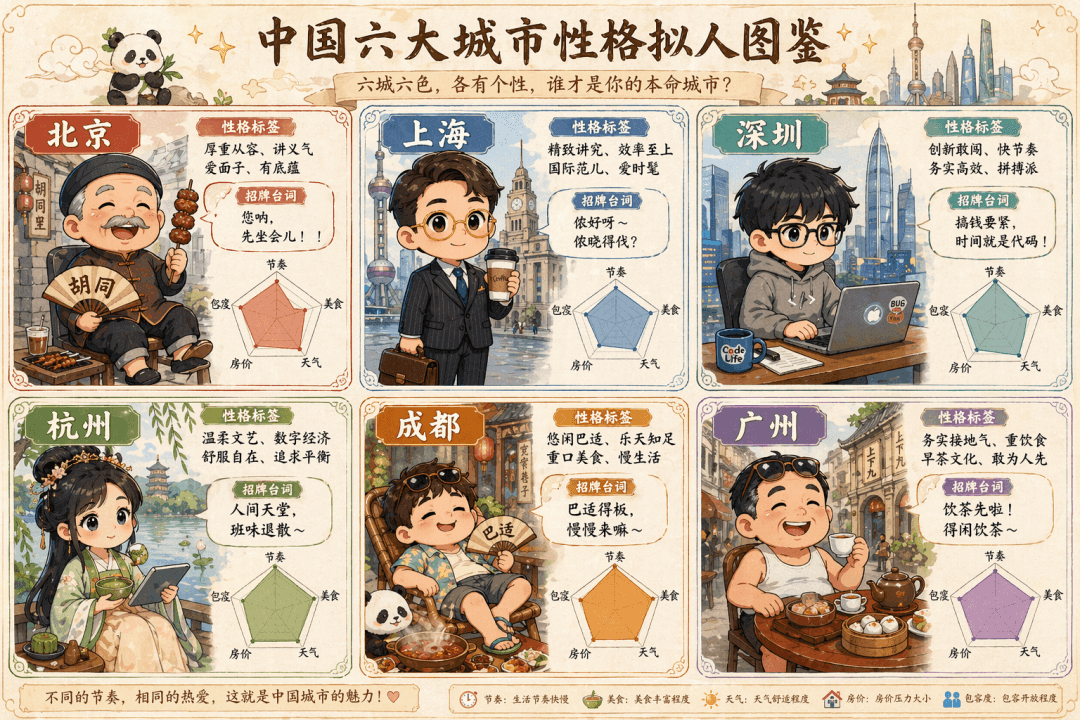
Prompt: dibuja un «catálogo personificado de la personalidad de seis ciudades chinas» en estilo kawaii dibujado a mano, con seis viñetas y seis personajitos chibi. Representan a Pekín (un señor del hutong en traje tang…
rápido
Prompt: dibuja un «catálogo personificado de la personalidad de seis ciudades chinas» en estilo kawaii dibujado a mano, con seis viñetas y seis personajitos chibi. Representan a Pekín (un señor del hutong en traje tang comiendo brochetas), Shanghái (oficinista élite con gafas doradas y café en mano), Shenzhen (programador con sudadera abrazando un portátil), Hangzhou (chica con hanfu sosteniendo matcha y una tableta), Chengdú (en pantalón corto y chanclas, recostado junto a un hot pot) y Cantón (un viejo cantonés en chanclas tomando dim sum). Cada viñeta lleva su etiqueta de personalidad, frase emblemática y un gráfico de radar (ritmo, gastronomía, clima, precio de la vivienda, tolerancia, cinco dimensiones); el conjunto se ve como un catálogo de criaturas.
Cómo utilizar este mensaje
Lea el mensaje Catálogo Kawaii #29 completo e identifique los requisitos del tema, el estilo, la cámara, la iluminación y la composición antes de generarlo.
Reemplace los marcadores de posición entre corchetes o estilo argumento con sus requisitos de producto, personaje, marca, escena, paleta de colores o relación de aspecto.
Abra https://www.gptimagehub.com/es/generate?promptId=cmogxpbjb00pdxt5grigwujv4, genere la imagen y luego refine el mensaje con un tema, texto, diseño o restricciones negativas más específicas si es necesario.
Preguntas frecuentes inmediatas
¿Para qué se utiliza mejor el mensaje Catálogo Kawaii #29?
Este mensaje se utiliza mejor para imágenes infografía / educación donde desea una estructura reutilizable, una dirección visual detallada y una calidad de salida consistente.
¿Puedo editar el mensaje antes de generarlo?
Sí. El texto completo del mensaje está visible en esta página para que pueda cambiar temas, nombres de productos, colores, composición, términos de la cámara, relación de aspecto y notas de estilo antes de la generación.
¿Qué modelo debo usar con este mensaje?
Utilice el modelo que se muestra en los metadatos del mensaje como punto de partida predeterminado. Si otro modelo de imagen admite la misma relación de aspecto y estilo de instrucción, puede adaptar el mensaje y comparar los resultados.