
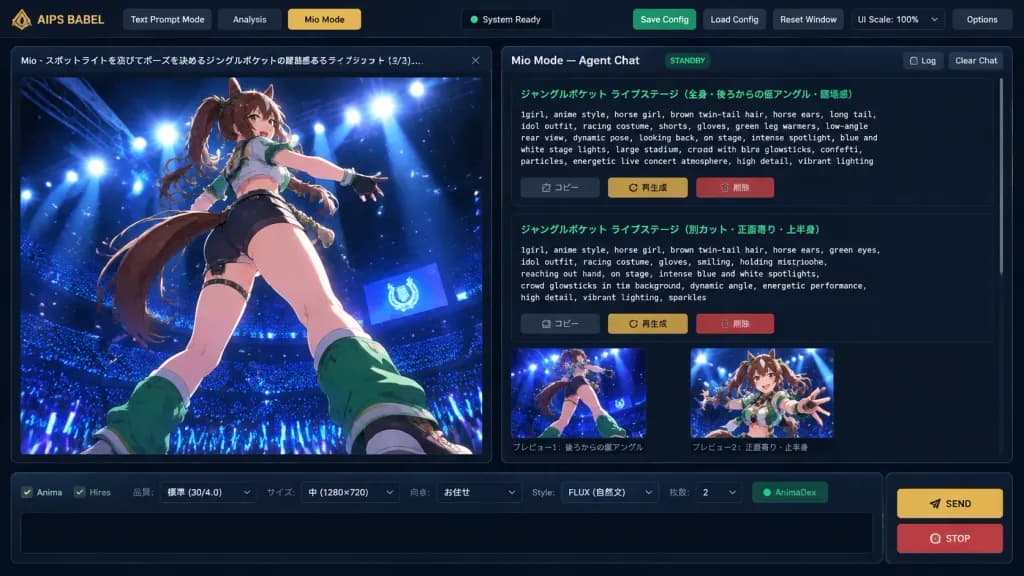
Interfaz de Generador de Prompts Anime en Modo Oscuro
Crea una maqueta de interfaz de escritorio en modo oscuro para ingeniería de prompts con vista previa anime. Modifica el nombre de la app, el personaje y los acentos de color.
Prompt
A crisp, detailed 16:9 digital UI concept mockup of an AI creative workspace application named "[AIPS BABEL // Prompt Foundry]", featuring a dark charcoal futuristic interface theme with thin blue-gray borders, subtle drop shadows, and gold accent buttons. Layout: - Top Navigation Bar: Application label "AIPS BABEL" on the left; three navigation tabs: "Text Prompt Mode", "Analysis", and an active gold-highlighted "Mio Mode"; a centered dark status indicator; right-side utility buttons: green "Save Config", gray "Load Config", gray "Reset Window", a "UI Scale: 100%" selector with a small gold arrow, and gray "Options". - Two-Column Main Workspace: 1. Left Column (1/3 width): Large vertical image preview panel with a tab header reading "Mio - スポットライトを浴びてポーズを決めるジャングルポケットの躍動感あるライブショット (3/3)..." and a close button. Inside the preview is high-quality anime key art showing [a dynamic anime horse-girl idol with brown twin-tail hair, animal ears, long tail, racing-idol outfit, shorts, gloves, and green leg warmers] captured from a dramatic low rear-angle pose on a glossy stage under intense blue and white spotlights, overlooking a dark stadium filled with blue glowsticks and glowing particles. 2. Right Column (2/3 width): Agent chat workspace titled "Mio Mode — Agent Chat" with "STANDBY" badge and "Log" and "Clear Chat" buttons. Below, a scrollable chat area displays two structured prompt cards with green Japanese titles and monospaced English prompt text describing the live concert scene, followed by Japanese action buttons: "コピー", "再生成", and a red "削除". Beneath the chat cards are two small preview thumbnails with Japanese captions. - Bottom Dock: A horizontal parameter bar with checkboxes ("Anima", "Hires"), dropdowns ("品質: 標準 (30/4.0)", "サイズ: 中 (1280×720)", "向き: お任せ", "Style: FLUX (自然文)", "枚数: 2"), a green "AnimaDex" indicator, an empty black text input box, and two stacked buttons on the right: a gold "SEND" button and a red "STOP" button.
Qué puedes personalizar
Antes de generar, cambia estas partes del prompt por tu propio tema o texto.
[AIPS BABEL // Prompt Foundry]marcador“AIPS BABEL”texto entre comillas“Text Prompt Mode”texto entre comillas“Analysis”texto entre comillas“Mio Mode”texto entre comillas“Save Config”texto entre comillas“Load Config”texto entre comillas“Reset Window”texto entre comillas
Detalles del prompt
- Categoría
- Diseño UI / UX
- Modelo
- GPT IMAGE 2
- Costo por imagen
- 1K: 43 créditos · 2K: 86 créditos · 4K: 143 créditos
- Relación de aspecto
- 16:9
- Añadido