
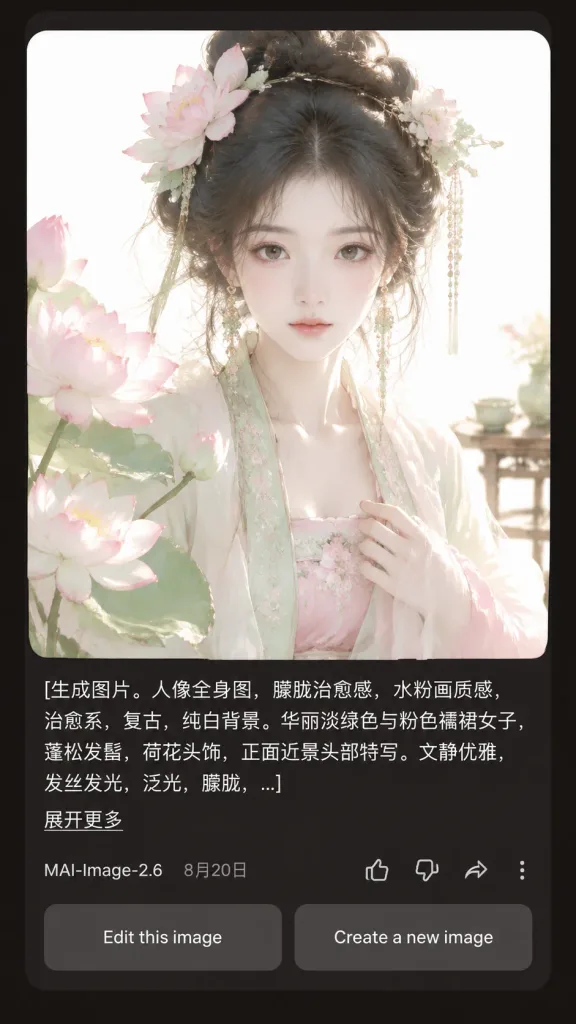
Interfaz de Resultado de IA en Modo Oscuro
Genera una captura de pantalla móvil realista en modo oscuro con una tarjeta de resultado de retrato IA. Modifica la descripción y los textos para adaptar la app.
Prompt
A realistic mobile app screenshot showing an AI image generation result card in dark mode, set against a dark charcoal-brown app background with rounded card borders and generous margins. Main content: - Top card: A large square portrait with rounded corners featuring [a beautiful young woman in pale green and pink Hanfu, lotus-flower hair ornaments, loose black updo, delicate dangling jewelry, soft melancholic expression, facing forward in a close-up half-body composition]. Style of the portrait: ethereal, vintage, soft pale watercolor-like, diffused daylight, glowing hair strands, translucent silk fabrics, pure white background, pastel lotus blossoms in the left foreground, a pale blossom hair ornament on the right, and a subtle tea table detail in the right background. - Prompt text block below image: Left-aligned white text spanning three lines ending in an ellipsis with the exact text: "[生成图片。人像全身图,朦胧治愈感,水粉画质感,治愈系,复古,纯白背景。华丽淡绿色与粉色襦裙女子,蓬松发髻,荷花头饰,正面近景头部特写。文静优雅,发丝发光,泛光,朦胧,...]". Beneath it, a small underlined link reads "[展开更多]". - Metadata row: Displays "[MAI-Image-2.6]" on the left next to date "[8月20日]". On the right, four outline icons: thumbs up, thumbs down, share arrow, and a vertical three-dot menu. - Bottom action buttons: Two side-by-side rounded rectangular gray buttons reading "Edit this image" and "Create a new image". Style: Crisp mobile UI typography, realistic app rendering, balanced dark mode layout, high visual contrast between the glowing pastel portrait and dark UI background.
Qué puedes personalizar
Antes de generar, cambia estas partes del prompt por tu propio tema o texto.
[展开更多]marcador[MAI-Image-2.6]marcador[8月20日]marcador“. Beneath it, a small underlined link reads”texto entre comillas“Edit this image”texto entre comillas“Create a new image”texto entre comillas
Detalles del prompt
- Categoría
- Diseño UI / UX
- Modelo
- GPT IMAGE 2
- Costo por imagen
- 1K: 43 créditos · 2K: 86 créditos · 4K: 143 créditos
- Relación de aspecto
- 9:16
- Añadido