
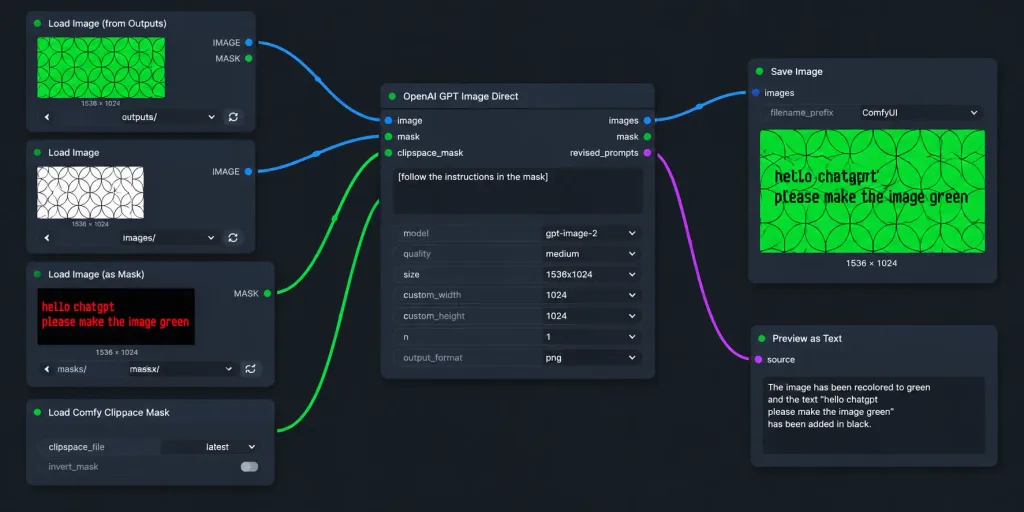
Flujo de Trabajo ComfyUI Oscuro con Máscara
Captura de pantalla de un flujo de ComfyUI en modo oscuro que muestra edición con texto en máscara. Modifica parámetros y texto para adaptarlo.
Prompt
A realistic widescreen screenshot of a dark-themed ComfyUI node graph workflow for AI image editing. The canvas features a dark charcoal background with a subtle dot grid and exactly seven UI node panels arranged left-to-right with curved connecting wires: 1. Top-left node titled "Load Image (from Outputs)": Shows a green rectangular preview of repeating geometric circle arcs, label "1536 × 1024", dropdown controls, and refresh buttons. 2. Mid-left node titled "Load Image": Displays a white preview with black overlapping geometric circles, labeled "1536 × 1024", with its blue IMAGE output socket connected to the central node. 3. Lower-mid-left node titled "Load Image (as Mask)": Features a dark preview with red pixelated text reading "hello chatgpt" on line one and "please make the image green" on line two, channel set to "red", with its green MASK output wired to the central node. 4. Bottom-left node titled "Load Comfy Clipspace Mask": Displays controls for clipspace_file "latest" and invert_mask toggle. 5. Center node titled "OpenAI GPT Image Direct": Contains image and mask inputs, outputs for images, mask, and revised_prompts. Textbox contains "[follow the instructions in the mask]". Settings show model "[gpt-image-2]", quality "[medium]", size "[1536x1024]", custom_width 1024, custom_height 1024, n 1, output_format png. Blue output links to Save Image; revised_prompts links to Preview as Text. 6. Upper-right node titled "Save Image": Displays filename_prefix "ComfyUI" and an output preview showing the circular pattern recolored to vibrant green with black text reading "hello chatgpt" and "please make the image green", labeled "1536 × 1024". 7. Lower-right node titled "Preview as Text": Partially cropped at bottom, showing "source" and a preview text box. Style: Clean flat UI mockup, crisp sans-serif text, rounded dark-gray panels, soft drop shadows, and vibrant blue and green connector cables without photorealistic real-world clutter.
Qué puedes personalizar
Antes de generar, cambia estas partes del prompt por tu propio tema o texto.
[follow the instructions in the mask]marcador[gpt-image-2]marcador[medium]marcador[1536x1024]marcador
Detalles del prompt
- Categoría
- Diseño UI / UX
- Modelo
- GPT IMAGE 2
- Costo por imagen
- 1K: 43 créditos · 2K: 86 créditos · 4K: 143 créditos
- Relación de aspecto
- 2:1
- Añadido