
Онбординг для мобильного аутентификатора
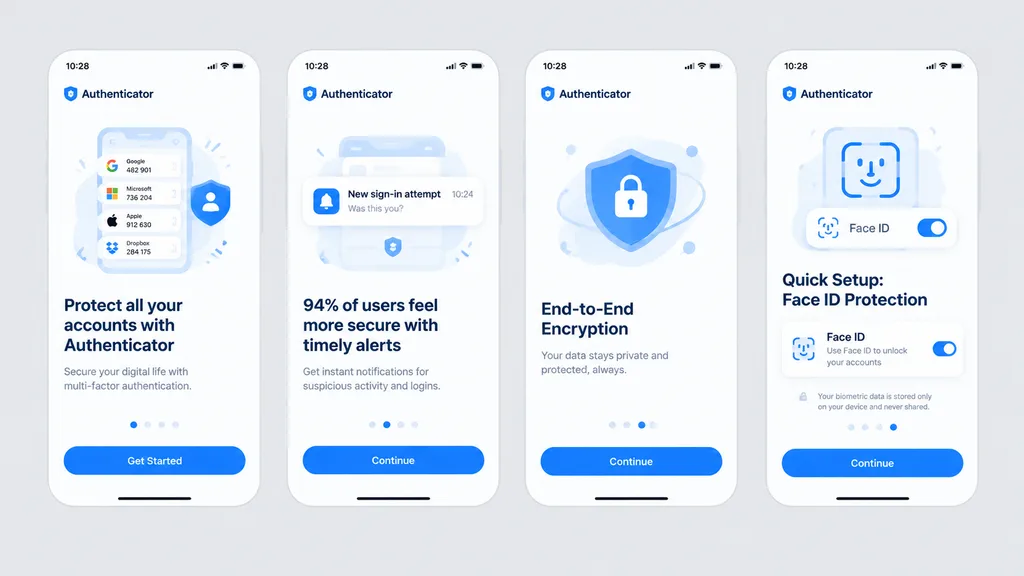
Создайте аккуратный мокап из четырех экранов онбординга приложения безопасности. Настройте акцентный цвет, название и текст под свой бренд.
Промпт
Clean front-facing design mockup of a mobile onboarding flow, recreating the UI from the reference photo. Display exactly four iPhone-style screens arranged horizontally and evenly spaced across a solid light gray background, completely flat with no perspective distortion, glare, browser chrome, or laptop borders, appearing as a crisp Figma export. Consistent white light theme with [bright blue] as the primary accent color, rounded card frames, modern typography hierarchy, vector icons, and clean UI illustrations. App name is [Authenticator], status bar time displays [10:28]. Four screens from left to right: 1) Authenticator accounts list with headline “Protect all your accounts with Authenticator” and CTA button “Get Started”. 2) Security alert notifications with headline “94% of users feel more secure with timely alerts” and CTA button “Continue”. 3) Shield and lock illustration with headline “End-to-End Encryption” and CTA button “Continue”. 4) Face ID setup with biometric scanning graphic, headline “Quick Setup: Face ID Protection”, Face ID toggle card, privacy note, and CTA button “Continue”.
Что можно изменить
Перед генерацией замените эти части промпта своей темой или текстом.
[bright blue]заполнитель[Authenticator]заполнитель“Protect all your accounts with Authenticator”текст в кавычках“Get Started”текст в кавычках“94% of users feel more secure with timely alerts”текст в кавычках“Continue”текст в кавычках“End-to-End Encryption”текст в кавычках“Quick Setup: Face ID Protection”текст в кавычках
Сведения о промпте
- Категория
- UI / UX дизайн
- Модель
- GPT IMAGE 2
- Стоимость за изображение
- 1K: 43 кредита · 2K: 86 кредитов · 4K: 143 кредита
- Соотношение сторон
- 16:9
- Добавлено