
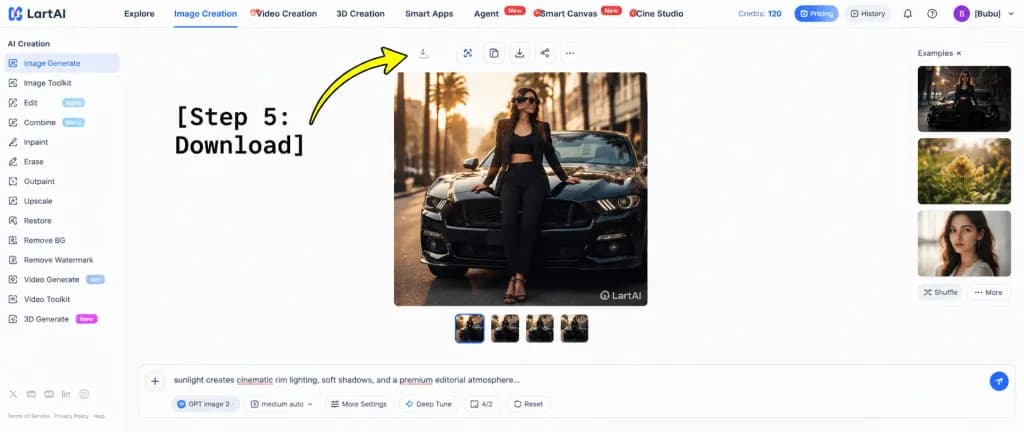
Инструкция по Скачиванию в Интерфейсе LartAI
Создает макет веб-интерфейса SaaS со стрелкой-подсказкой к кнопке скачивания. Легко настроить центральное изображение, имя пользователя и текст шага.
Промпт
A wide tutorial screenshot graphic showing the LartAI image generation web application interface with an instructional overlay for downloading a generated image. High-key bright white UI layout, clean SaaS dashboard aesthetics, thin light gray dividers, crisp typography, and balanced negative space. Composition & Layout: - Full browser web app interface without browser chrome. - Left sidebar (approx. 12% width): Under the header "AI Creation", exactly 14 navigation items: "Image Generate" (selected with a blue indicator), "Image Toolkit", "Edit" with a "Nano" badge, "Combine" with a "Nano" badge, "Inpaint", "Erase", "Outpaint", "Upscale", "Restore", "Remove BG", "Remove Watermark", "Video Generate" with a "Veo" badge, "Video Toolkit", and "3D Generate" with a "New" badge. Bottom footer shows tiny legal and policy text links with miniature social icons. - Top navigation bar: Full width, showing the "LartAI" logo at far left. Seven navigation tabs: "Explore", "Image Creation" (active with a blue underline), "Video Creation", "3D Creation", "Smart Apps", "Agent" (with red "New" tag), "Smart Canvas" (with red "New" tag), and "Cine Studio". Far right displays "Credits: 120", pill buttons for "Pricing" and "History", subtle utility icons, and a purple circular avatar with initial "B" beside the username "[Bubu]". - Central canvas: A large square fashion editorial photo showing [a stylish woman wearing sunglasses, a black blazer, black crop top, black trousers, and strappy heels] leaning against the front hood of [a glossy black Ford Mustang] on a city street at golden hour, palm trees and architecture softly blurred in the background with warm cinematic rim lighting. A subtle "LartAI" watermark appears in the bottom right corner of the picture. Above the image is a toolbar of small square action buttons (including a download icon); below the image are four small square variant thumbnails, the first highlighted with a blue border. - Right panel: Labeled "Examples ×", featuring three vertically stacked preview thumbnails (dark automotive fashion, yellow flowers, woman's portrait) with "Shuffle" and "More" text buttons below. - Bottom input dock: A wide prompt bar with a plus button on the left, displaying prompt text starting with "sunlight creates cinematic rim lighting, soft shadows, and a premium editorial atmosphere..." with red squiggly spellcheck underlines on select words. Underneath are control tags: "GPT Image 2", "medium auto", "More Settings", "Deep Tune", "4/2", "Reset", and a circular blue submit button. - Graphic Annotation Overlay: At the left-center, bold large black typewriter monospace text reading "[Step 5: Download]" with a thick, curved bright yellow arrow with a black outline sweeping upward and pointing directly at the small download icon in the top toolbar above the square generated image.
Что можно изменить
Перед генерацией замените эти части промпта своей темой или текстом.
[Bubu]заполнитель[a glossy black Ford Mustang]заполнитель“AI Creation”текст в кавычках“Image Generate”текст в кавычках“Image Toolkit”текст в кавычках“Edit”текст в кавычках“Nano”текст в кавычках“Combine”текст в кавычках
Сведения о промпте
- Категория
- UI / UX дизайн
- Модель
- GPT IMAGE 2
- Стоимость за изображение
- 1K: 43 кредита · 2K: 86 кредитов · 4K: 143 кредита
- Соотношение сторон
- 21:9
- Добавлено