
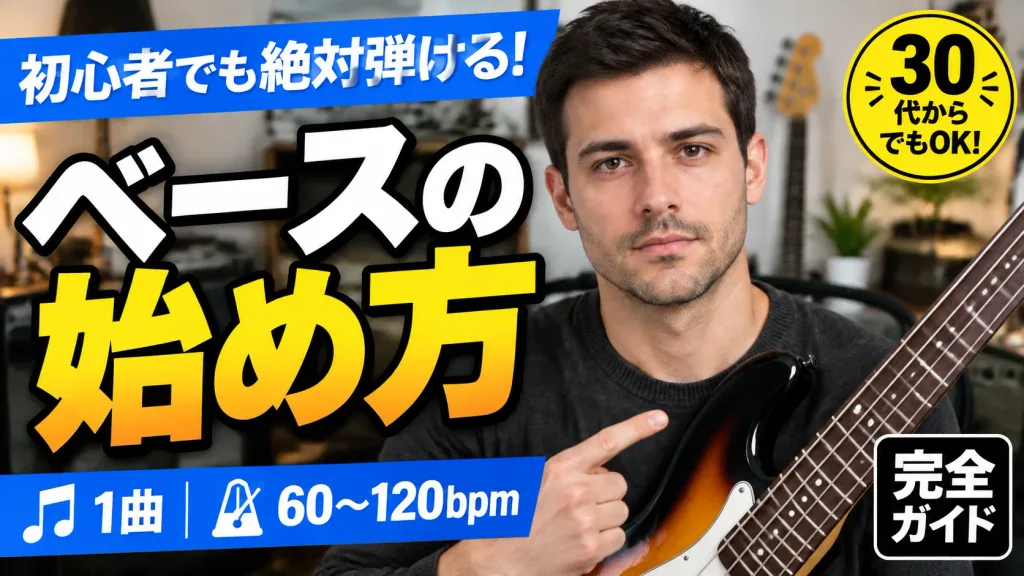
Tukar Wajah Thumbnail dengan Tata Letak Utuh
Mengganti wajah orang di thumbnail YouTube tanpa mengubah tata letak, teks, atau lencana. Sesuaikan tanda kurung untuk menentukan subjek atau gaya thumbnail.
Prompt
Using the second reference photo as the current YouTube-style thumbnail layout and the first reference photo as the identity reference, regenerate the thumbnail preserving the exact layout, composition, and text badges. Replace only the man's face so it matches [the same person as in the identity reference photo]. Keep the existing pose, pointing finger, bass guitar, room background, bright studio lighting, and high-contrast YouTube thumbnail aesthetic unchanged. Preserve all five visible Japanese text badges and graphic elements exactly: the top blue banner, the large main Japanese headline, the bottom blue music and tempo bar, the yellow circular age badge, and the bottom-right black square badge. Do not alter any typography or graphic layout.
Yang bisa Anda ubah
Sebelum membuat gambar, ganti bagian prompt ini dengan subjek atau teks Anda sendiri.
[the same person as in the identity reference photo]placeholder
Detail prompt
- Kategori
- Media sosial
- Model
- GPT IMAGE 2
- Biaya per gambar
- 1K: 43 kredit · 2K: 86 kredit · 4K: 143 kredit
- Rasio aspek
- 16:9
- Ditambahkan