
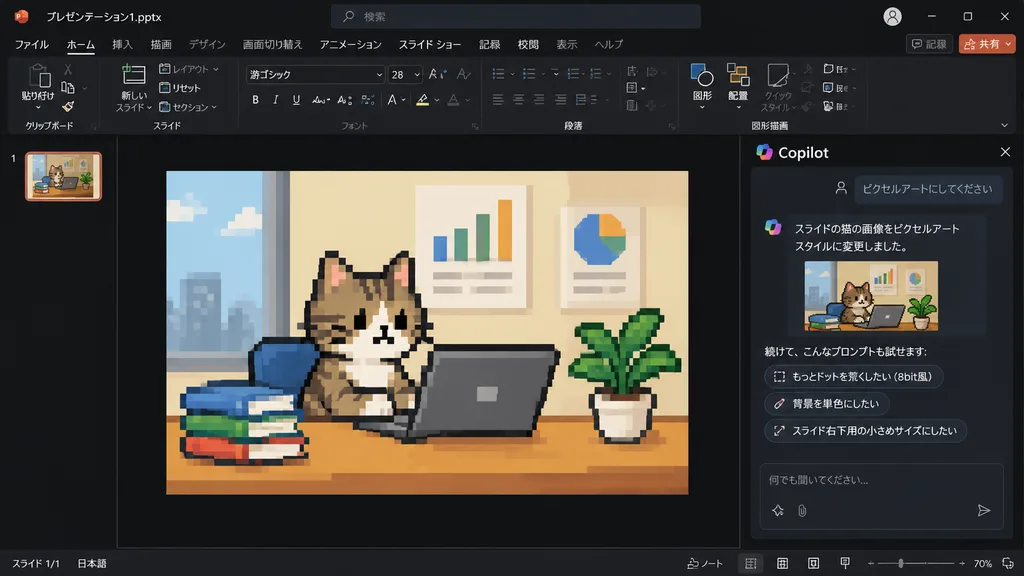
Slide Kucing Pixel Art di PowerPoint Copilot
Menghasilkan tangkapan layar antarmuka PowerPoint Copilot mode gelap dengan foto slide yang diubah menjadi pixel art 8-bit retro. Sesuaikan gambar atau teks obrolan.
Prompt
Using the reference photo of a PowerPoint dark-mode Copilot interface screenshot, transform only the inserted slide image into retro 8-bit pixel art while keeping the rest of the layout, UI, and composition strictly unchanged. Within the slide, redraw the [tabby cat sitting at a desk with a laptop, books, potted plant, and wall charts] in chunky, low-resolution game-style pixel art with visible square pixels and simplified shading. Update the Japanese Copilot side panel chat text: the user prompt box displays 「ピクセルアートにしてください」, followed by an AI response stating the cat image was changed to pixel art style, and three suggested follow-up prompt pills: 「もっとドットを荒くしたい(8bit風)」, 「背景を単色にしたい」, and 「スライド右下用の小さめサイズにしたい」.
Yang bisa Anda ubah
Sebelum membuat gambar, ganti bagian prompt ini dengan subjek atau teks Anda sendiri.
“ピクセルアートにしてください”teks dalam tanda kutip“もっとドットを荒くしたい(8bit風)”teks dalam tanda kutip“背景を単色にしたい”teks dalam tanda kutip“スライド右下用の小さめサイズにしたい”teks dalam tanda kutip
Detail prompt
- Kategori
- Desain UI / UX
- Model
- GPT IMAGE 2
- Biaya per gambar
- 1K: 43 kredit · 2K: 86 kredit · 4K: 143 kredit
- Rasio aspek
- 16:9
- Ditambahkan