
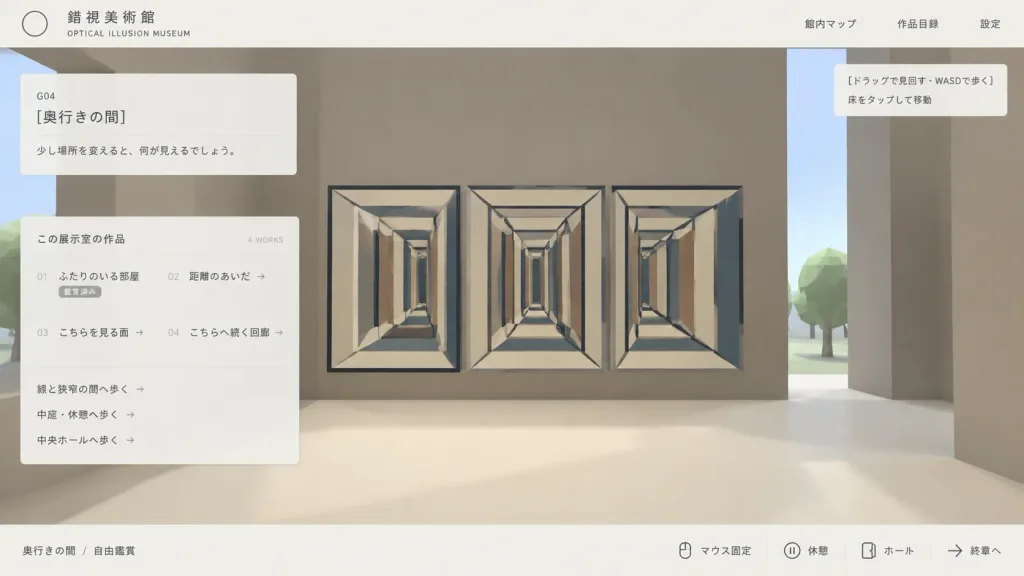
Mockup UI Web Minimalis Museum 3D
Menghasilkan mockup antarmuka web Jepang minimalis untuk menjelajahi museum ilusi optik 3D low-poly. Sesuaikan teks dan judul dalam tanda kurung siku.
Prompt
Clean Japanese web UI mockup screenshot for an interactive 3D optical illusion museum called "[錯視美術館]", presented as an in-browser gallery navigation interface. Composition & Layout: Wide 16:9 screenshot composition, clean desktop browser view. A pale off-white top navigation bar and a thin off-white bottom status bar frame the view. A flat translucent UI overlay rests over a simple stylized low-poly 3D museum environment. Lots of negative space with a minimalist programmer-made aesthetic. Top Bar: - Top left: Thin outlined circle logo, Japanese museum name "[錯視美術館]", and small English subtitle "OPTICAL ILLUSION MUSEUM". - Top right: Exactly three navigation links: "館内マップ", "作品目録", and "設定". 3D Environment View: - Stylized first-person museum interior with massive blocky taupe walls, a cream floor, a vertical slit revealing pale sky, and low-poly green trees outside. - Main artwork: An impossible-perspective corridor installation featuring three adjacent rectangular tunnel drawings (left, center, right) with repeating cream frames, dark blue-gray outline beams, converging perspective lines, and alternating vertical rectangular panels in beige, brown, and blue-gray. - A tiny black mouse cursor near the upper-left of the central corridor artwork. Overlays & Panels: - Upper left translucent card: Room code "G04", title "[奥行きの間]", and description text "[少し場所を変えると、何が見えるでしょう。]". - Larger translucent catalog card below: Header "この展示室の作品" with "4 WORKS" on the right. Four catalog items in two columns: "01 ふたりのいる部屋" (status "鑑賞済み"), "02 距離のあいだ →", "03 こちらを見る面 →", and "04 こちらへ続く回廊 →". Beneath the list, three route links: "線と狭窄の間へ歩く →", "中庭・休憩へ歩く →", and "中央ホールへ歩く →". - Upper right tooltip box: Exactly two lines: "[ドラッグで見回す・WASDで歩く]" and "床をタップして移動". - Bottom status bar: Left breadcrumb "奥行きの間 / 自由鑑賞". Right side features key/icon indicators followed by controls: "マウス固定", "休憩", "ホール", and "終章へ". Style & Color: Muted beige, taupe, cream, charcoal, and dusty blue-gray palette. Crisp vector typography, fine divider lines, subtle translucency, soft shadows, low-poly 3D graphics. No photorealism, no people, no watermarks.
Yang bisa Anda ubah
Sebelum membuat gambar, ganti bagian prompt ini dengan subjek atau teks Anda sendiri.
[錯視美術館]placeholder[奥行きの間]placeholder[少し場所を変えると、何が見えるでしょう。]placeholder[ドラッグで見回す・WASDで歩く]placeholder“OPTICAL ILLUSION MUSEUM”teks dalam tanda kutip“館内マップ”teks dalam tanda kutip“作品目録”teks dalam tanda kutip“設定”teks dalam tanda kutip
Detail prompt
- Kategori
- Desain UI / UX
- Model
- GPT IMAGE 2
- Biaya per gambar
- 1K: 43 kredit · 2K: 86 kredit · 4K: 143 kredit
- Rasio aspek
- 16:9
- Ditambahkan