
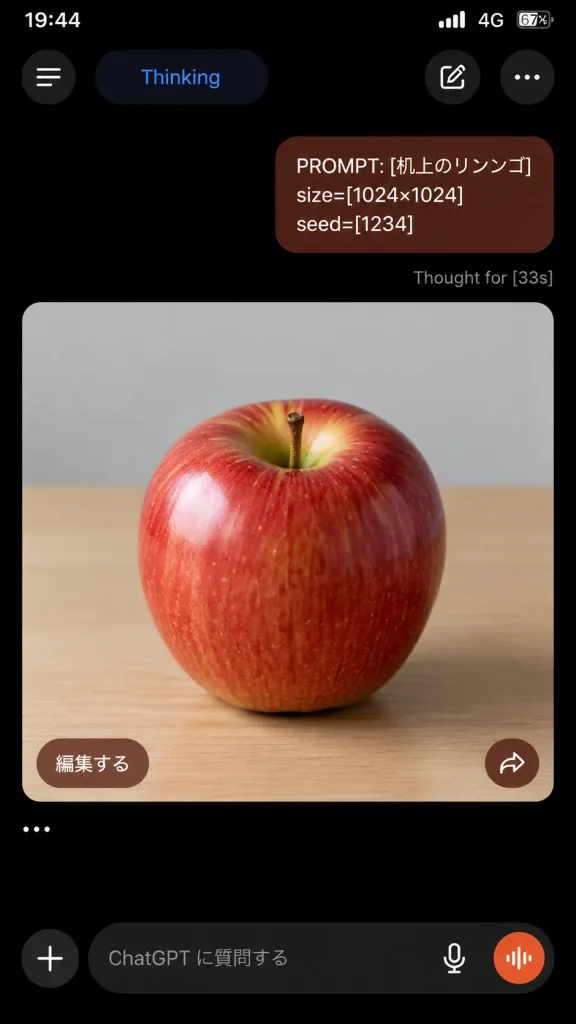
Tangkapan Layar Pembuatan Gambar ChatGPT Mode Gelap
Menghasilkan tangkapan layar realistis aplikasi seluler ChatGPT mode gelap dengan prompt dan hasil gambar. Sesuaikan teks prompt, ukuran, dan seed di dalam kurung siku.
Prompt
A realistic vertical smartphone screenshot of the ChatGPT mobile app in dark mode, 9:16 aspect ratio, displaying an image generation conversation. At the top, an iPhone-style status bar shows 19:44, cellular bars, 4G, and 67% battery on a pitch black background. The top app navigation bar features four elements: a circular hamburger menu button on the far left, a rounded pill labeled "Thinking" in blue text, a rounded button with a pencil edit icon, and a three-dot menu icon on the far right. Below, a single right-aligned user chat bubble in dark reddish-brown with rounded corners contains three lines of text: "PROMPT: [机上のリンゴ]" "size=[1024×1024]" "seed=[1234]" Directly beneath the user bubble, small gray status text reads: "Thought for [33s]". Below the status text is a large rounded-corner image card filling most of the screen width. Inside the card is a photorealistic image of a glossy red apple centered on a light wooden tabletop under soft studio lighting, with yellow-green highlights near the stem indentation, subtle vertical streaks, a small brown stem, and a softly blurred pale gray wall in the background. In the lower-left corner of the image card, there is a rounded brown button labeled "編集する". In the lower-right corner, there is a circular brown button with a white share arrow icon. Below the card, a single standalone ellipsis line displays "…". At the bottom of the screen, the ChatGPT text input bar features a plus icon button, placeholder text reading "ChatGPT に質問する", a microphone icon, and an orange circular voice-waveform button inside a dark rounded input container. Authentic iOS dark theme UI, crisp typography, clean spacing, no watermarks, no browser chrome.
Yang bisa Anda ubah
Sebelum membuat gambar, ganti bagian prompt ini dengan subjek atau teks Anda sendiri.
[机上のリンゴ]placeholder[1024×1024]placeholder[1234]placeholder[33s]placeholder“Thinking”teks dalam tanda kutip“PROMPT: [机上のリンゴ]”teks dalam tanda kutip“size=[1024×1024]”teks dalam tanda kutip“seed=[1234]”teks dalam tanda kutip
Detail prompt
- Kategori
- Desain UI / UX
- Model
- GPT IMAGE 2
- Biaya per gambar
- 1K: 43 kredit · 2K: 86 kredit · 4K: 143 kredit
- Rasio aspek
- 9:16
- Ditambahkan