
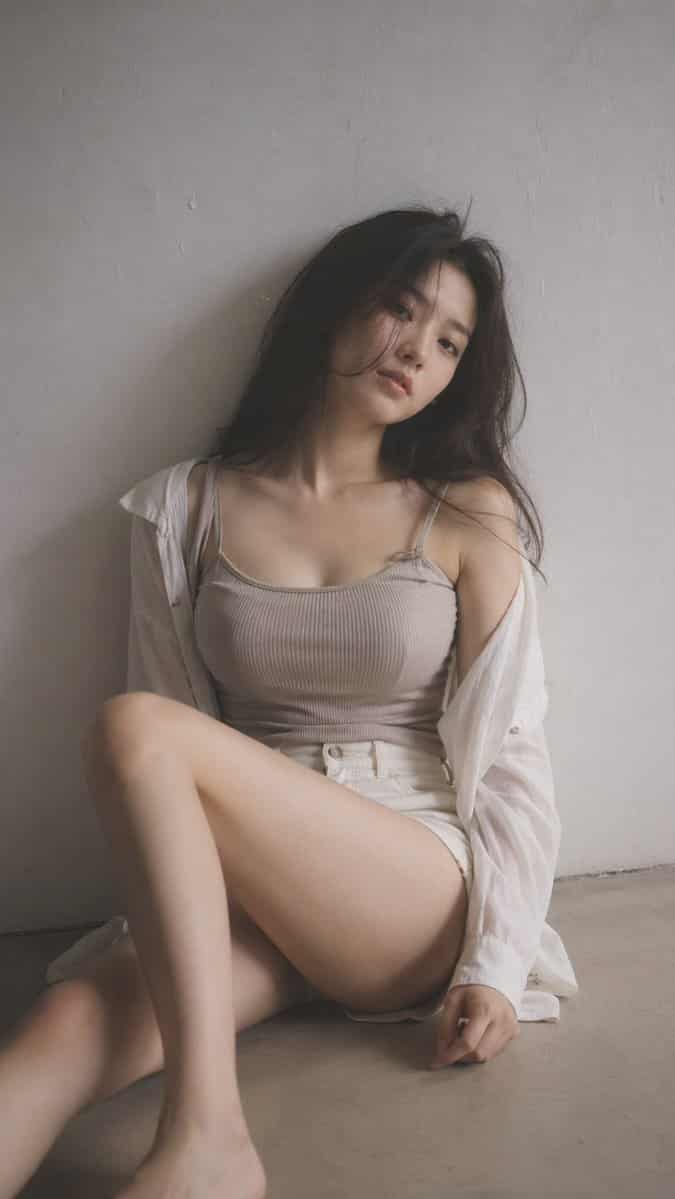
Potret Editorial Kabut Hitam Lembut
9:16 vertikal — potret editorial, filter kabut hitam lembut subjek tunggal, kabut halus, highlight mekar lembut, warna teredam ruang dalam ruangan minimal, latar belakang bersih, tekstur tipis wanita muda Korea, riasan…
Cepat
9:16 vertikal — potret editorial, filter kabut hitam lembut subjek tunggal, kabut halus, highlight mekar lembut, warna teredam ruang dalam ruangan minimal, latar belakang bersih, tekstur tipis wanita muda Korea, riasan minimal, pakaian bertekstur kulit alami: atasan rajutan berusuk atau kamisol lembut berlapis di bawah kemeja longgar, dipadukan dengan celana pendek atau rok berpinggang tinggi; kain sedikit menempel pada bentuk tubuh, lembut dan alami, tidak ada elemen yang terbuka rambut: sedikit berantakan, pose bervolume alami: duduk di lantai dengan satu kaki ditekuk dan kaki lainnya rileks, tubuh sedikit condong, bahu tidak sejajar, kepala dimiringkan komposisi: subjek sedikit keluar dari tengah, ruang negatif ekspresi saat ini: tenang, agak jauh, bibir alami pencahayaan: cahaya samping yang lembut, bayangan lembut suasana hati yang tidak jelas: bersahaja, tenang, halus sensual melalui garis tubuh alami, santai dan tidak diposisikan kualitas: butiran halus, sedikit kelembutan, tampilan realistis
Cara menggunakan perintah ini
Baca perintah Potret Editorial Kabut Hitam Lembut secara lengkap dan identifikasi persyaratan subjek, gaya, kamera, pencahayaan, dan komposisi sebelum membuatnya.
Ganti placeholder dalam tanda kurung atau gaya argumen dengan persyaratan produk, karakter, merek, adegan, palet warna, atau rasio aspek Anda.
Buka https://www.gptimagehub.com/id/generate?promptId=cmogwrt0h0015zpdys698d3dm, buat gambarnya, lalu sempurnakan perintah dengan subjek, teks, tata letak, atau batasan negatif yang lebih spesifik jika diperlukan.
Pertanyaan Umum yang cepat
Untuk apa perintah Potret Editorial Kabut Hitam Lembut paling baik digunakan?
Perintah ini paling baik digunakan untuk gambar potret dan fotografi yang menginginkan struktur yang dapat digunakan kembali, arah visual yang mendetail, dan kualitas keluaran yang konsisten.
Bisakah saya mengedit prompt sebelum membuat?
Ya. Teks perintah lengkap terlihat di halaman ini sehingga Anda dapat mengubah subjek, nama produk, warna, komposisi, istilah kamera, rasio aspek, dan catatan gaya sebelum pembuatan.
Model mana yang harus saya gunakan dengan perintah ini?
Gunakan model yang ditampilkan dalam metadata perintah sebagai titik awal default. Jika model gambar lain mendukung rasio aspek dan gaya instruksi yang sama, Anda dapat menyesuaikan perintah dan membandingkan hasilnya.