
Cepat
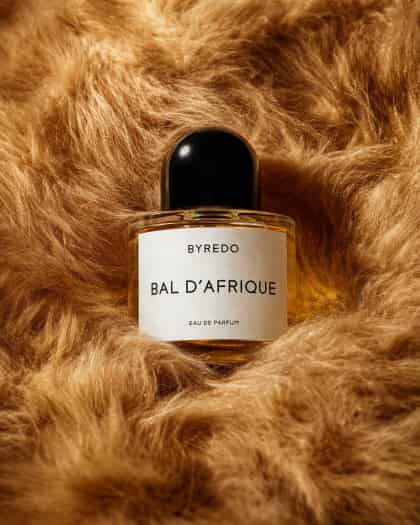
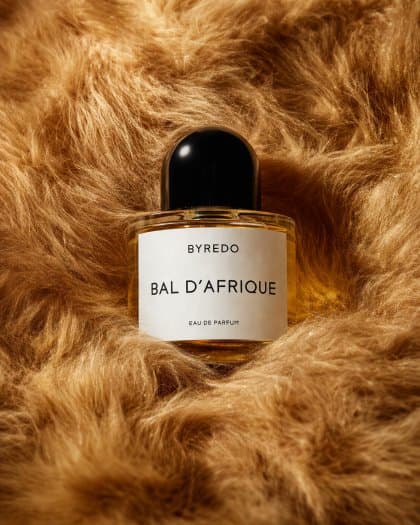
Foto produk editorial mewah dari satu botol parfum yang diletakkan di dalam bulu palsu yang lebat dan mewah dengan warna karamel emas yang kaya dan warna coklat madu. Pusatkan komposisi pada satu botol kaca oval bening berisi cairan kuning hangat, dengan tutup hitam bulat mengkilap dan label persegi panjang putih bersih. Teks label harus bertuliskan {argument name="brand name" default="BYREDO"} di bagian atas, {argument name="product name" default="BAL D’AFRIQUE"} besar di tengah, dan {argument name="product type" default="EAU DE PARFUM"} dalam teks kecil di dekat bagian bawah. Bidik sebagai still life close-up dengan pencahayaan studio yang lembut, sorotan halus pada kaca dan tutupnya, bayangan lembut di lipatan bulu, dan palet warna sinematik yang hangat. Botol harus diletakkan sedikit tertanam di dalam bulu sehingga tekstur di sekelilingnya membingkainya dari semua sisi, menciptakan suasana editorial fesyen premium, komposisi minimal, kedalaman bidang yang dangkal, fokus tajam pada label, dan estetika kampanye kecantikan kelas atas.
Cara menggunakan perintah ini
Baca perintah Botol Parfum Editorial dalam Bulu Emas secara lengkap dan identifikasi persyaratan subjek, gaya, kamera, pencahayaan, dan komposisi sebelum membuatnya.
Ganti placeholder dalam tanda kurung atau gaya argumen dengan persyaratan produk, karakter, merek, adegan, palet warna, atau rasio aspek Anda.
Buka https://www.gptimagehub.com/id/generate?promptId=cmogx57cb00f3zpdyro5ubkl4, buat gambarnya, lalu sempurnakan perintah dengan subjek, teks, tata letak, atau batasan negatif yang lebih spesifik jika diperlukan.
Pertanyaan Umum yang cepat
Untuk apa perintah Botol Parfum Editorial dalam Bulu Emas paling baik digunakan?
Perintah ini paling baik digunakan untuk gambar lainnya yang menginginkan struktur yang dapat digunakan kembali, arah visual yang mendetail, dan kualitas keluaran yang konsisten.
Bisakah saya mengedit prompt sebelum membuat?
Ya. Teks perintah lengkap terlihat di halaman ini sehingga Anda dapat mengubah subjek, nama produk, warna, komposisi, istilah kamera, rasio aspek, dan catatan gaya sebelum pembuatan.
Model mana yang harus saya gunakan dengan perintah ini?
Gunakan model yang ditampilkan dalam metadata perintah sebagai titik awal default. Jika model gambar lain mendukung rasio aspek dan gaya instruksi yang sama, Anda dapat menyesuaikan perintah dan membandingkan hasilnya.