
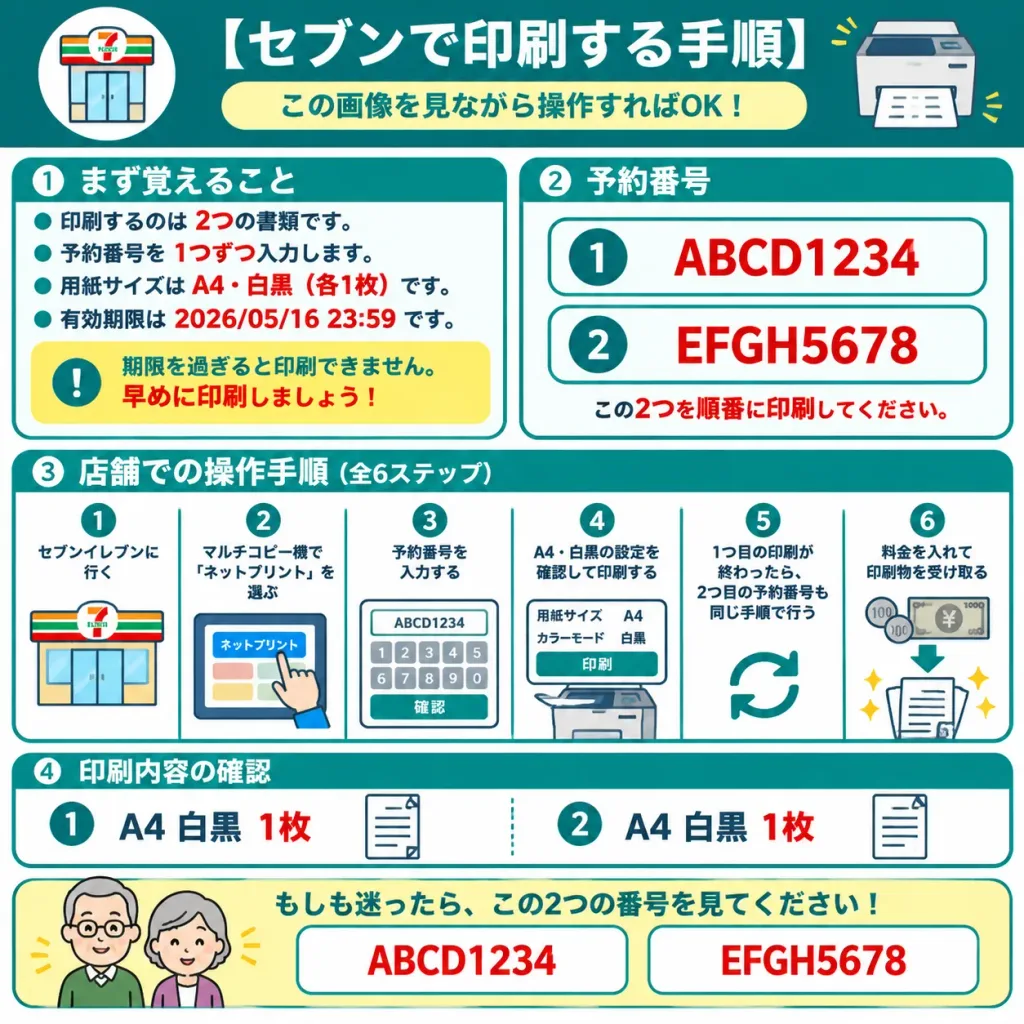
Инфографика Печати в Круглосуточном Магазине
Создайте понятную инструкцию на японском для пожилых по печати на копире в магазине. Меняйте номера бронирования и текст в скобках.
Промпт
A friendly Japanese step-by-step infographic instruction sheet for printing two reserved net-print documents at a 7-Eleven multifunction copier, designed so an elderly parent can understand it at a glance. Composition & Layout: Square 1:1 infographic layout on a crisp white background with teal borders and rounded cards, bold teal section headers, red emphasis text, and simple flat vector icons. Clean, high-contrast laminated how-to guide style with large, legible Japanese typography. Header: Dark teal top banner with a circular 7-Eleven storefront icon on the left and a printer icon on the right. Large white center headline reading "[セブンで印刷する手順]" above a pale yellow rounded pill subtitle reading "[この画像を見ながら操作すればOK!]". Section 1 (Top Left Card): Titled "[① まず覚えること]". Exactly 4 teal bullet points and 1 yellow warning box. The bullet points state in Japanese: 2 documents to print, enter reservation numbers one by one, paper size is A4 black-and-white (1 copy each), and expiration deadline is 2026/05/16 23:59. Red text emphasis on "2", "1", "A4", "白黒", "各1枚", and the date. The warning box features a teal exclamation icon and a reminder warning that printing expires after the deadline, so print early. Section 2 (Top Right Card): Titled "[② 予約番号]". Exactly 2 large reservation number rows with teal circled numbers: row 1 displays "[ABCD1234]", row 2 displays "[EFGH5678]". Each row is inside a white rounded rectangular badge with a teal outline, followed by a red note below: print these two in order. Section 3 (Middle Full-Width Card): Store workflow guide showing exactly 6 numbered vertical steps separated by thin teal dividers, each headed by a teal circle number: - Step 1: Visit 7-Eleven, with storefront icon. - Step 2: Select "Net Print" on the copier touchscreen, with touchscreen icon and pointing hand. - Step 3: Input reservation number, showing keypad screen with "[ABCD1234]" and confirm button. - Step 4: Verify A4 black-and-white settings and print, with settings panel icon and output tray. - Step 5: After first print completes, repeat procedure for the second reservation number, with circular repeat arrows. - Step 6: Insert coins or banknotes and collect printed sheets, with coin, bill, downward arrow, and sparkle icons. Section 4 (Lower Card): Print contents summary showing exactly 2 items separated by a dotted teal divider: - Item 1: Teal circled 1, large text "A4 白黒 1枚", document sheet icon. - Item 2: Teal circled 2, large text "A4 白黒 1枚", document sheet icon. Bottom Help Strip: Pale yellow rounded container with simplified friendly elderly couple avatars on the left. Teal headline stating that if confused, just check these two numbers, featuring two prominent bordered display boxes with "[ABCD1234]" and "[EFGH5678]". Constraints: Clean vector graphics, strictly 4 numbered cards plus bottom strip, exactly 6 workflow steps, large legible Japanese text, neat grid alignment, no extraneous brand logos.
Что можно изменить
Перед генерацией замените эти части промпта своей темой или текстом.
[セブンで印刷する手順]заполнитель[この画像を見ながら操作すればOK!]заполнитель[① まず覚えること]заполнитель[② 予約番号]заполнитель[ABCD1234]заполнитель[EFGH5678]заполнитель“,”текст в кавычках“Net Print”текст в кавычках
Сведения о промпте
- Категория
- Инфографика / Образование
- Модель
- GPT IMAGE 2
- Стоимость за изображение
- 1K: 43 кредита · 2K: 86 кредитов · 4K: 143 кредита
- Соотношение сторон
- 1:1
- Добавлено