
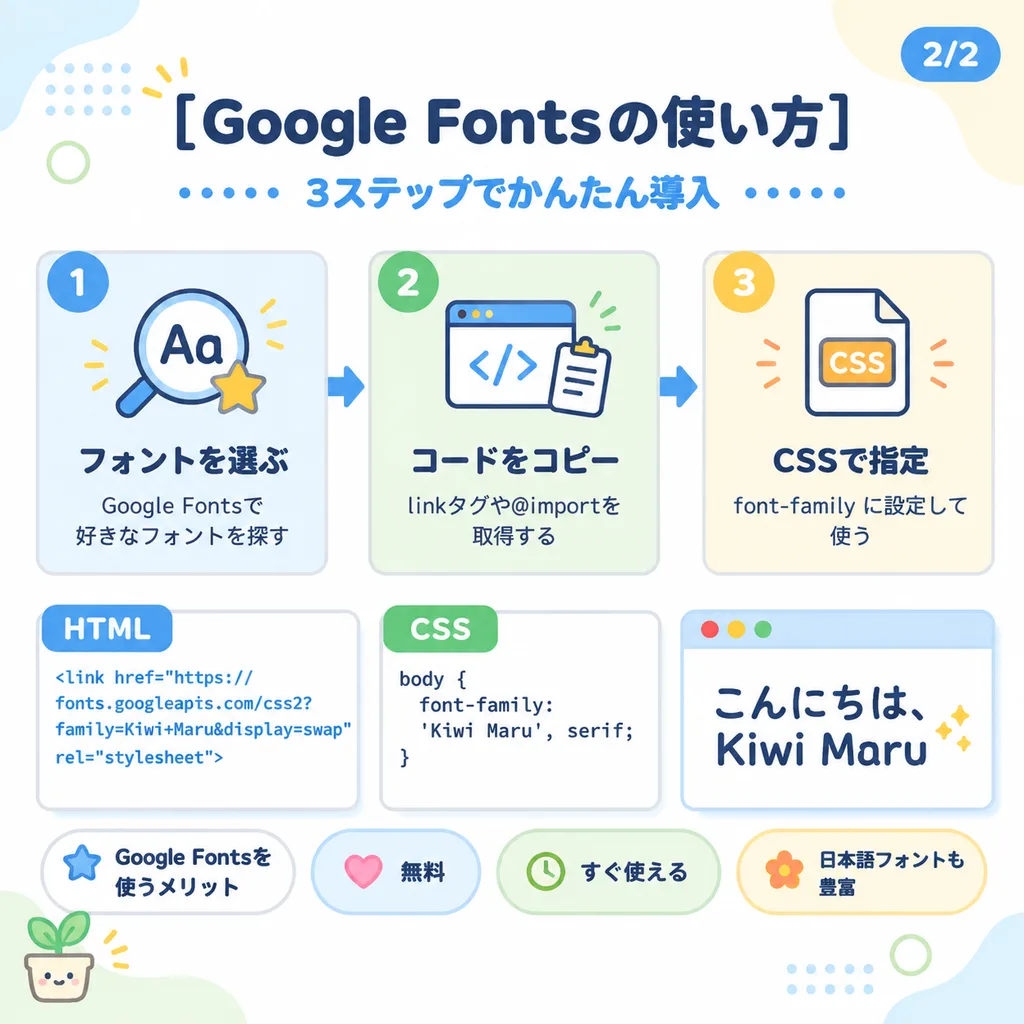
पेस्टल जापानी वेब ट्यूटोरियल इन्फोग्राफिक स्लाइड
कोड स्निपेट और चरणबद्ध कार्ड के साथ एक प्यारा शैक्षिक स्लाइड बनाता है। किसी भी विषय के लिए शीर्षक, आइकन या कोड को बदलें।
प्रॉम्प्ट
Cute pastel Japanese infographic slide design on a clean white background with soft, rounded abstract corner blobs in pale blue, cream, and light green. Modern, friendly vector layout featuring thick rounded sans-serif Japanese typography, subtle soft drop shadows, thin light gray outlines, dotted accents, and small decorative doodles. Top Section: - Centered bold dark navy headline: "[Google Fontsの使い方]". - Blue subheadline beneath: "[3ステップでかんたん導入]", flanked on both sides by horizontal rows of small blue dots. - Top-right corner: rounded blue page badge labeled "[2/2]". - Top-left decor: yellow 3-stroke sparkle, pale blue dotted grid pattern in background, and a thin light green circle. Upper Middle Row (3 Step Cards with blue directional arrows between them): - Card 1 (pale blue background, blue circular "1" badge): Magnifying glass icon over "Aa" with a yellow star. Bold title "[フォントを選ぶ]" and text "[Google Fontsで好きなフォントを探す]". - Card 2 (pale green background, green circular "2" badge): Browser window icon with "</>" code brackets and clipboard. Bold title "[コードをコピー]" and text "[linkタグや@importを取得する]". - Card 3 (pale cream background, orange circular "3" badge): Document icon labeled "CSS" with orange accents. Bold title "[CSSで指定]" and text "[font-family に設定して使う]". Lower Middle Row (3 Code & Preview Panels): - Left Panel: White card with blue "HTML" tab. Displays blue text: "<link href=\"https://fonts.googleapis.com/css2?family=Kiwi+Maru&display=swap\" rel=\"stylesheet\">" - Center Panel: White card with green "CSS" tab. Displays dark code text: "body { font-family: 'Kiwi Maru', serif; }" - Right Panel: White mock browser with pale blue title bar and red, yellow, green window dots. Displays large cute rounded handwritten Japanese text: "[こんにちは、Kiwi Maru]", with two small sparkle accents on the right. Bottom Row: - Four rounded pill badges: "[Google Fontsを使うメリット]" (white with blue star), "[無料]" (pale blue with pink heart), "[すぐ使える]" (pale green with clock icon), "[日本語フォントも豊富]" (pale yellow with flower icon). - Bottom-left corner decor: tiny smiling potted plant illustration.
आप क्या बदल सकते हैं
इमेज बनाने से पहले प्रॉम्प्ट के इन हिस्सों को अपने विषय या शब्दों से बदलें।
[Google Fontsの使い方]प्लेसहोल्डर[3ステップでかんたん導入]प्लेसहोल्डर[2/2]प्लेसहोल्डर[フォントを選ぶ]प्लेसहोल्डर[Google Fontsで好きなフォントを探す]प्लेसहोल्डर[コードをコピー]प्लेसहोल्डर[linkタグや@importを取得する]प्लेसहोल्डर[CSSで指定]प्लेसहोल्डर
प्रॉम्प्ट का विवरण
- श्रेणी
- इन्फोग्राफ़िक / शिक्षा
- मॉडल
- GPT IMAGE 2
- प्रति इमेज लागत
- 1K: 43 क्रेडिट · 2K: 86 क्रेडिट · 4K: 143 क्रेडिट
- आस्पेक्ट रेशियो
- 1:1
- जोड़ा गया