
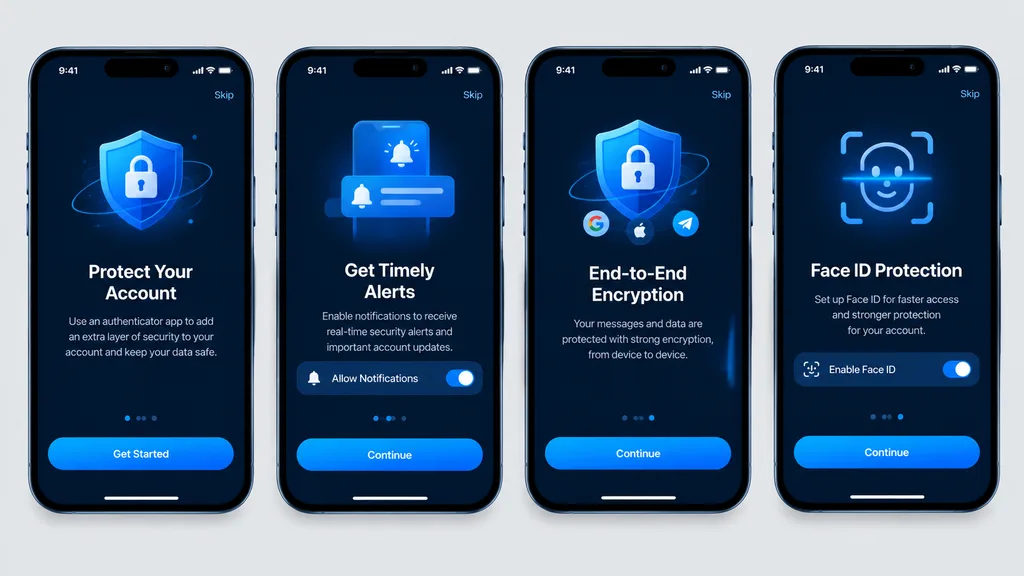
نماذج واجهة مستخدم تهيئة لتطبيق مصادقة بالوضع الداكن
تدفق تهيئة مستخدم متنقل من أربع شاشات يعرض واجهة تطبيق أمان بالوضع الداكن. غيّر ألوان التمييز أو نصوص الأزرار أو الأيقونات لتناسب أي تطبيق.
المطالبة
Clean, high-fidelity UI mockups recreating 4 mobile onboarding screens based on the reference design, rendered as direct digital graphic mockups without perspective distortion, glare, or device surroundings. The four [iPhone-style] smartphone frames are aligned front-facing and evenly spaced in a single horizontal row on a [light gray] background canvas. Dark mode theme featuring a [blue security visual style], rounded phone bezels, top status bars, top skip links, and bottom home indicators. From left to right, exactly 4 screens: 1. Authenticator account protection screen with main call-to-action button labeled "[Get Started]". 2. Timely alerts screen featuring a notification permission toggle switch and a button labeled "[Continue]". 3. End-to-end encryption screen featuring a shield and lock graphic, social icons, and a button labeled "[Continue]". 4. Face ID protection quick setup screen featuring a biometric scan overlay graphic, activation toggle, and a button labeled "[Continue]". Crisp vector typography, consistent spacing, sharp readable text, and polished app store presentation quality.
ما يمكنك تخصيصه
قبل الإنشاء، استبدل هذه الأجزاء من المطالبة بموضوعك أو نصك الخاص.
[iPhone-style]عنصر نائب[light gray]عنصر نائب[blue security visual style]عنصر نائب[Get Started]عنصر نائب[Continue]عنصر نائب
تفاصيل المطالبة
- الفئة
- تصميم UI / UX
- النموذج
- GPT IMAGE 2
- التكلفة لكل صورة
- 1K: 43 رصيد · 2K: 86 رصيد · 4K: 143 رصيد
- نسبة العرض إلى الارتفاع
- 16:9
- تاريخ الإضافة