
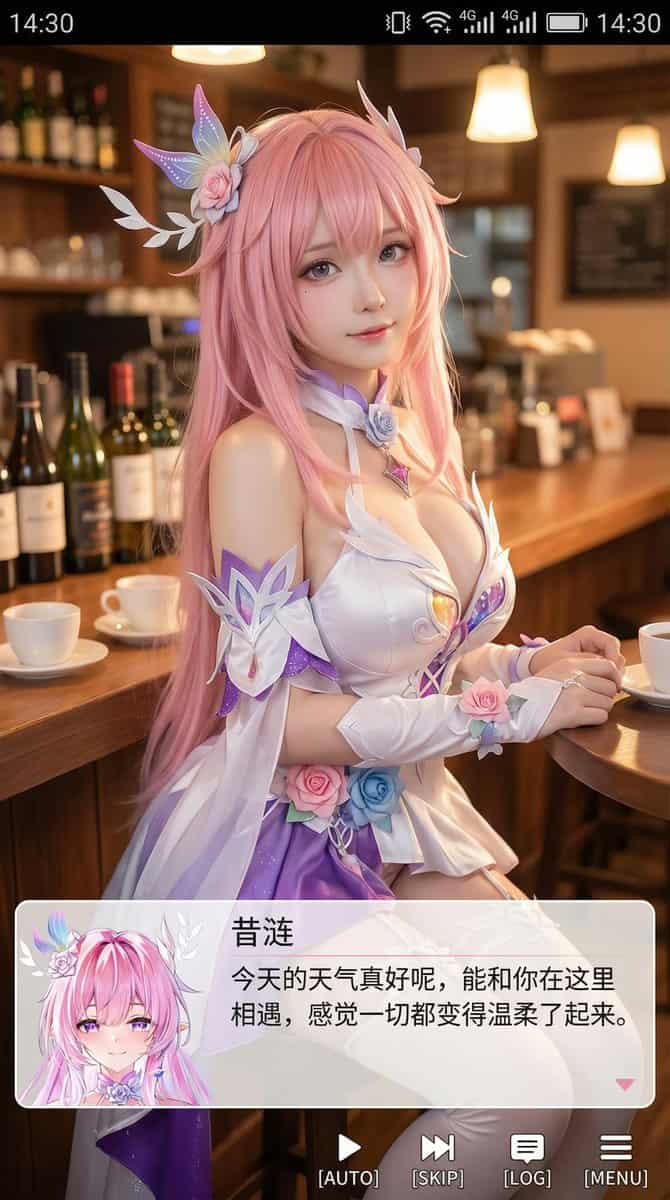
لقطة شاشة بورتريه كوسبلير 9:16
أنشئ صورة بأسلوب لقطة شاشة هاتف عمودي، بنسبة قريبة من 9:16. في وسط الصورة وأعلى قليلاً، كوسبلير حقيقي يجسد شخصية أنمي (اسم الشخصية). الشخصية بأسلوب واقعي لكن بملامح أنمي خفيفة، بشرة دقيقة، عيون أكبر قليلاً، تعبير لطيف ي…
موجه
أنشئ صورة بأسلوب لقطة شاشة هاتف عمودي، بنسبة قريبة من 9:16. في وسط الصورة وأعلى قليلاً، كوسبلير حقيقي يجسد شخصية أنمي (اسم الشخصية). الشخصية بأسلوب واقعي لكن بملامح أنمي خفيفة، بشرة دقيقة، عيون أكبر قليلاً، تعبير لطيف ينظر للكاميرا، يجلس في مشهد داخلي مريح مثل مقهى أو حانة، الخلفية تحتوي على دعائم تتوافق مع المشهد. أعلى الصورة أضف واجهة شريط حالة نظام الهاتف بما فيها الوقت والبطارية والإشارة والشبكة، ليبدو كأنه لقطة شاشة هاتف. أسفل الصورة، ضع مربع حوار شفاف بأسلوب galgame عريض، على جانبه الأيسر صورة رمزية أنمي أو Q-style مطابقة للشخصية في الصورة، على الجانب الأيمن نص: السطر الأول بخط أكبر يعرض اسم الشخصية كما هو سابقاً، تحته سطر أو سطرين بحوار بسيط بالصينية المبسطة بأسلوب لطيف يناسب شخصية الكوسبلير، تكتبه أنت تلقائياً. أسفل مربع الحوار شريط عمليات يحاكي واجهة galgame. الأسلوب العام عالي الدقة، غني بالتفاصيل، إضاءة ناعمة، اندماج طبيعي بين الأنمي والصور الواقعية.
كيفية استخدام هذه المطالبة
اقرأ المطالبة لقطة شاشة بورتريه كوسبلير 9:16 الكاملة وحدد متطلبات الموضوع والنمط والكاميرا والإضاءة والتركيب قبل الإنشاء.
استبدل العناصر النائبة بين قوسين أو على شكل وسيطة بمتطلبات المنتج أو الشخصية أو العلامة التجارية أو المشهد أو لوحة الألوان أو نسبة العرض إلى الارتفاع.
افتح https://www.gptimagehub.com/ar/generate?promptId=cmogwrhxg000tzpdy21m69pmn، وقم بإنشاء الصورة، ثم قم بتحسين المطالبة باستخدام موضوع أو نص أو تخطيط أو قيود سلبية أكثر تحديدًا إذا لزم الأمر.
الأسئلة الشائعة السريعة
ما هو أفضل استخدام للموجه لقطة شاشة بورتريه كوسبلير 9:16؟
يتم استخدام هذه المطالبة بشكل أفضل مع صور أنمي / مانغا حيث تريد بنية قابلة لإعادة الاستخدام، واتجاه مرئي مفصل، وجودة إخراج متسقة.
هل يمكنني تعديل المطالبة قبل الإنشاء؟
نعم. يظهر نص المطالبة الكامل في هذه الصفحة حتى تتمكن من تغيير الموضوعات وأسماء المنتجات والألوان والتركيب ومصطلحات الكاميرا ونسبة العرض إلى الارتفاع وملاحظات النمط قبل الإنشاء.
ما النموذج الذي يجب أن أستخدمه مع هذه المطالبة؟
استخدم النموذج الموضح في بيانات تعريف المطالبة كنقطة بداية افتراضية. إذا كان نموذج صورة آخر يدعم نفس نسبة العرض إلى الارتفاع ونمط التعليمات، فيمكنك تعديل المطالبة ومقارنة النتائج.