
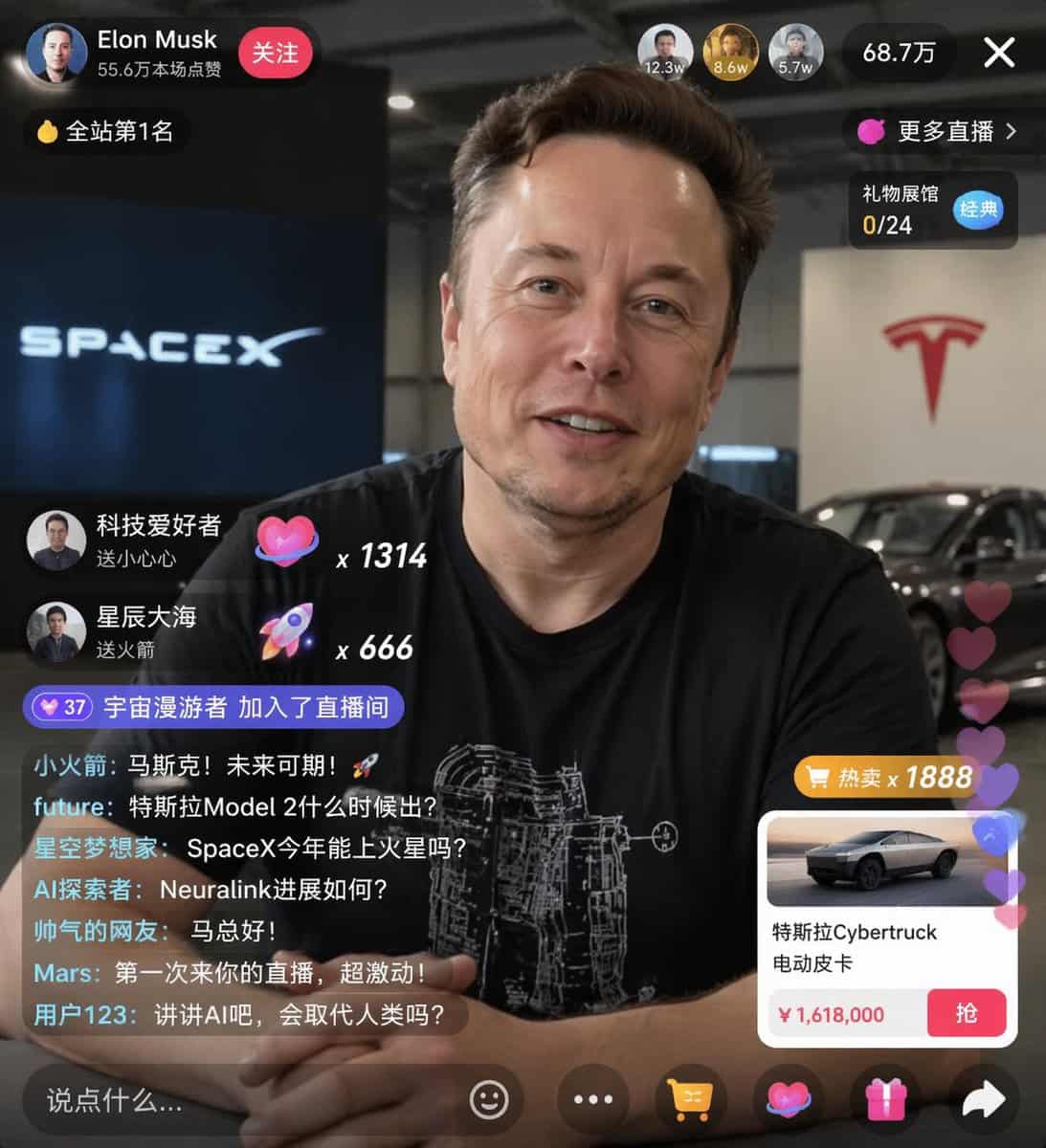
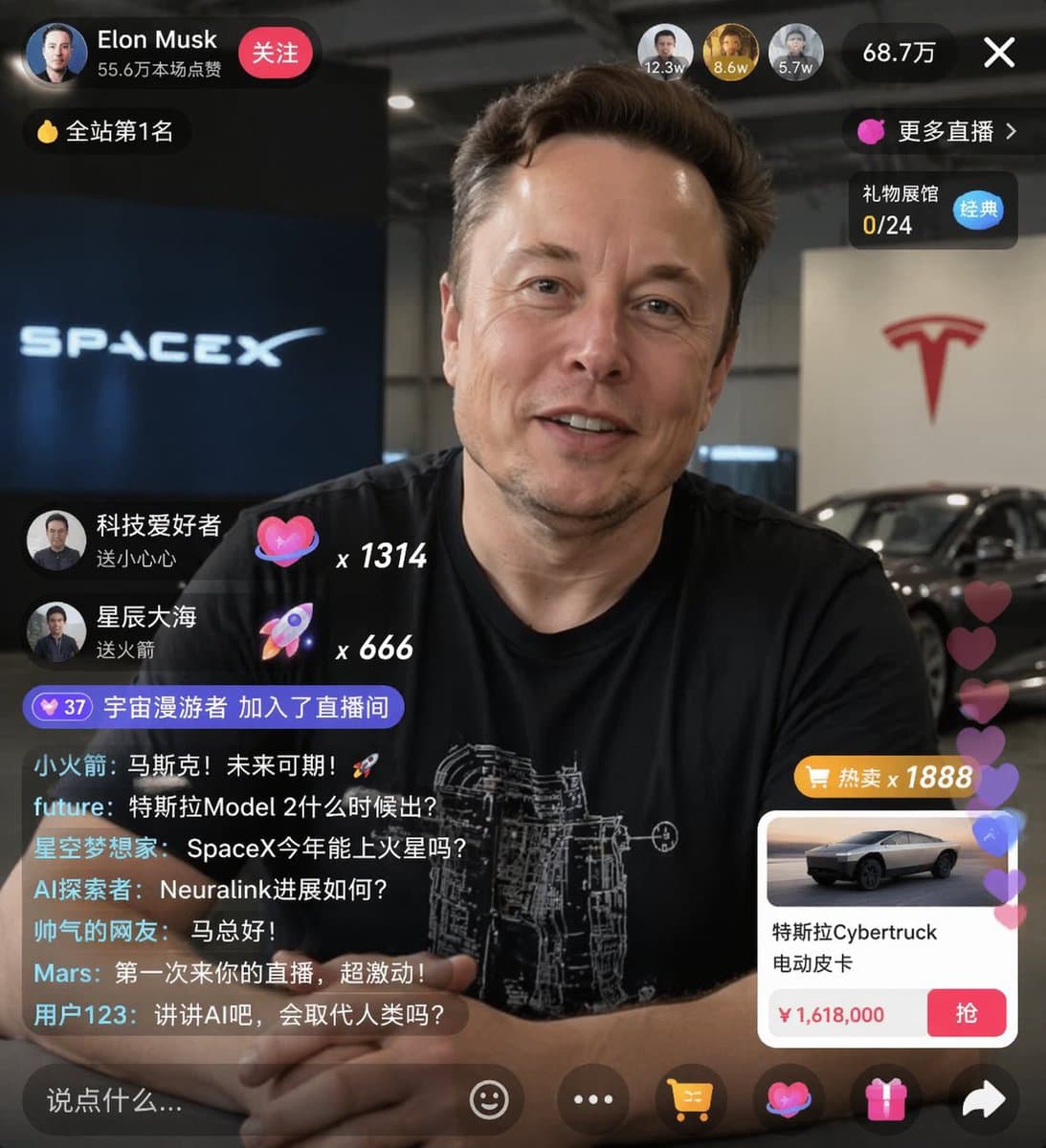
نموذج واجهة بث مباشر للتجارة الإلكترونية
{ "type": "نموذج واجهة المستخدم للبث المباشر"، "الموضوع": { "description": "صورة شخصية لـ {argument name=\"host name\" default=\"Elon Musk\"}، مبتسمًا، وهو يرتدي قميصًا أسود مع رسم تخطيطي تقني أبيض"، "background": "يظهر…
موجه
{ "type": "نموذج واجهة المستخدم للبث المباشر"، "الموضوع": { "description": "صورة شخصية لـ {argument name=\"host name\" default=\"Elon Musk\"}، مبتسمًا، وهو يرتدي قميصًا أسود مع رسم تخطيطي تقني أبيض"، "background": "يظهر الجانب الأيسر شاشة بها نص '{argument name=\"left background logo\" default=\"SPACEX\"}'، بينما يعرض الجانب الأيمن شاشة مكتوب عليها '{argument name=\"right background logo\" default=\"Tesla T logo\"}' باللون الأحمر وسيارة داكنة" }, "ui_overlay": { "الرأس العلوي": { "host_info": "صورة رمزية، الاسم '{argument name=\"host name\" default=\"Elon Musk\"}'، النص الفرعي '556,000 إعجاب'، زر 'متابعة' باللون الأحمر"، "rank_badge": "أيقونة العملة الذهبية مع 'رقم 1 على الموقع'"، "viewer_stats": "3 صور رمزية للمشاهدين مع '12.3w'، '8.6w'، '5.7w'، إجمالي '687,000'، زر إغلاق 'X'"، "right_links": ""المزيد من البث المباشر >'، 'قاعة معرض الهدايا 0/24' مع علامة 'كلاسيكية' باللون الأزرق" }, "mid_left_gifts": { "العدد": 2، "العناصر": [ "الصورة الرمزية "عشاق التكنولوجيا"، "أرسل قلبًا صغيرًا"، رمز القلب × 1314"، "الصورة الرمزية "بحر مليء بالنجوم"، "إرسال صاروخ"، أيقونة صاروخ × 666" ] }, "bottom_left_chat": { "system_message": "شارة المستوى 37 'انضمام Space Wanderer إلى غرفة البث المباشر'", "عدد_الرسائل": 7، "الرسائل": [ "الصاروخ الصغير: المسك! المستقبل واعد! 🚀"، "المستقبل: متى سيتم إصدار تسلا موديل 2؟"، "Star Dreamers: هل يستطيع SpaceX الذهاب إلى المريخ هذا العام؟"، "AI Explorer: كيف يتم التقدم الذي أحرزته شركة Neuralink؟"، "مستخدم الإنترنت الوسيم: مرحبًا سيد ما!"، "المريخ: إنها المرة الأولى التي أحضر فيها البث المباشر الخاص بكم، متحمس جدًا!", "المستخدم 123: دعونا نتحدث عن الذكاء الاصطناعي. هل سيحل محل البشر؟" ] }, "bottom_right_product_card": { "hot_tag": "تخفيضات كبيرة باللون البرتقالي × 1888'", "image": "تسلا سايبرتراك", "العنوان": "{argument name=\"product name\" default=\"特斯拉Cybertruck 电动皮卡\"}"، "السعر": "{argument name=\"product price\" default=\"¥ 1,618,000\"}"، "button": "زر "الإمساك" الأحمر"، "floating_animation": "قلوب شفافة تطفو على الحافة اليمنى" }, "الشريط السفلي": { "input_field": ""قل شيئًا...'", "أيقونات": ["وجه مبتسم"، "ثلاث نقاط"، "عربة التسوق"، "صندوق الهدايا"، "مشاركة"] } } }
كيفية استخدام هذه المطالبة
اقرأ المطالبة نموذج واجهة بث مباشر للتجارة الإلكترونية الكاملة وحدد متطلبات الموضوع والنمط والكاميرا والإضاءة والتركيب قبل الإنشاء.
استبدل العناصر النائبة بين قوسين أو على شكل وسيطة بمتطلبات المنتج أو الشخصية أو العلامة التجارية أو المشهد أو لوحة الألوان أو نسبة العرض إلى الارتفاع.
افتح https://www.gptimagehub.com/ar/generate?promptId=cmogwxwj3009hzpdyjdxym0wy، وقم بإنشاء الصورة، ثم قم بتحسين المطالبة باستخدام موضوع أو نص أو تخطيط أو قيود سلبية أكثر تحديدًا إذا لزم الأمر.
الأسئلة الشائعة السريعة
ما هو أفضل استخدام للموجه نموذج واجهة بث مباشر للتجارة الإلكترونية؟
يتم استخدام هذه المطالبة بشكل أفضل مع صور تصميم ui / ux حيث تريد بنية قابلة لإعادة الاستخدام، واتجاه مرئي مفصل، وجودة إخراج متسقة.
هل يمكنني تعديل المطالبة قبل الإنشاء؟
نعم. يظهر نص المطالبة الكامل في هذه الصفحة حتى تتمكن من تغيير الموضوعات وأسماء المنتجات والألوان والتركيب ومصطلحات الكاميرا ونسبة العرض إلى الارتفاع وملاحظات النمط قبل الإنشاء.
ما النموذج الذي يجب أن أستخدمه مع هذه المطالبة؟
استخدم النموذج الموضح في بيانات تعريف المطالبة كنقطة بداية افتراضية. إذا كان نموذج صورة آخر يدعم نفس نسبة العرض إلى الارتفاع ونمط التعليمات، فيمكنك تعديل المطالبة ومقارنة النتائج.