
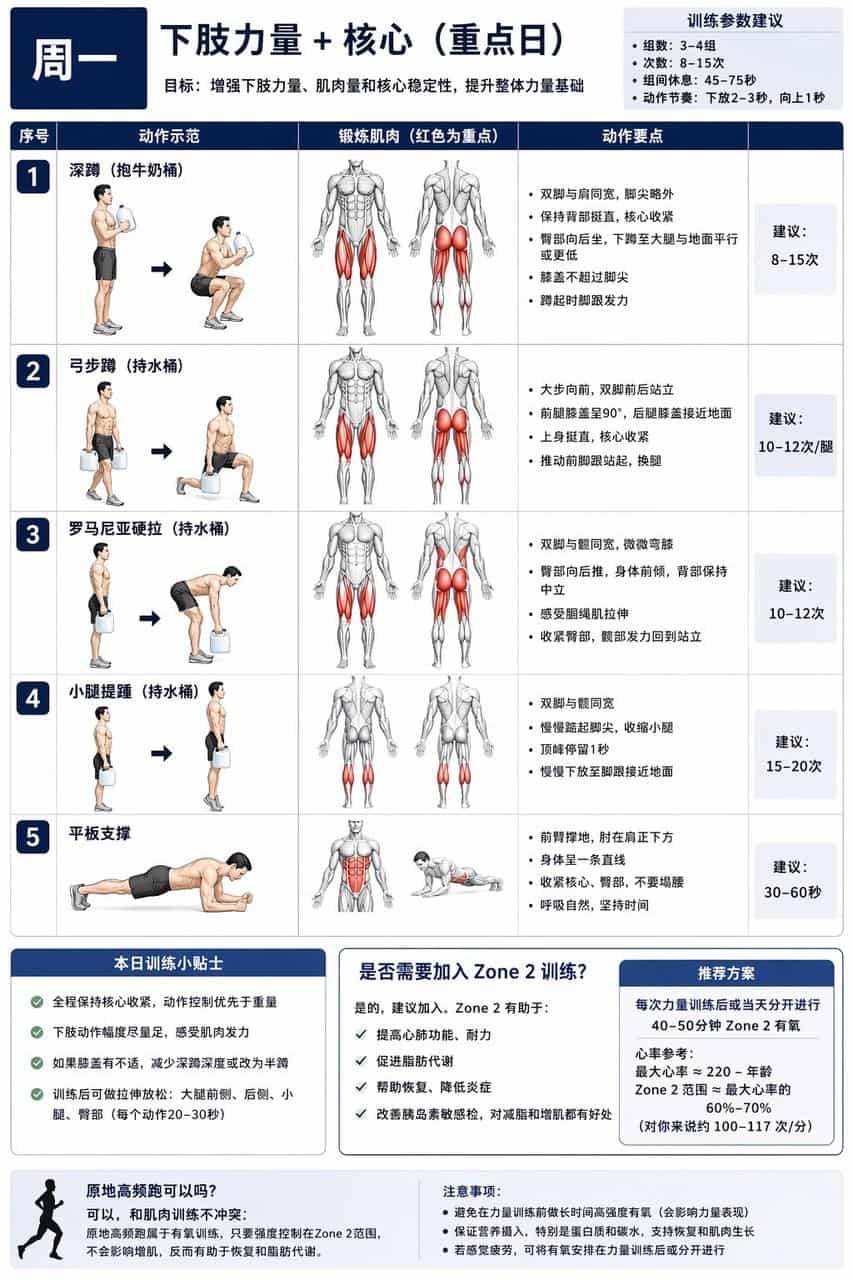
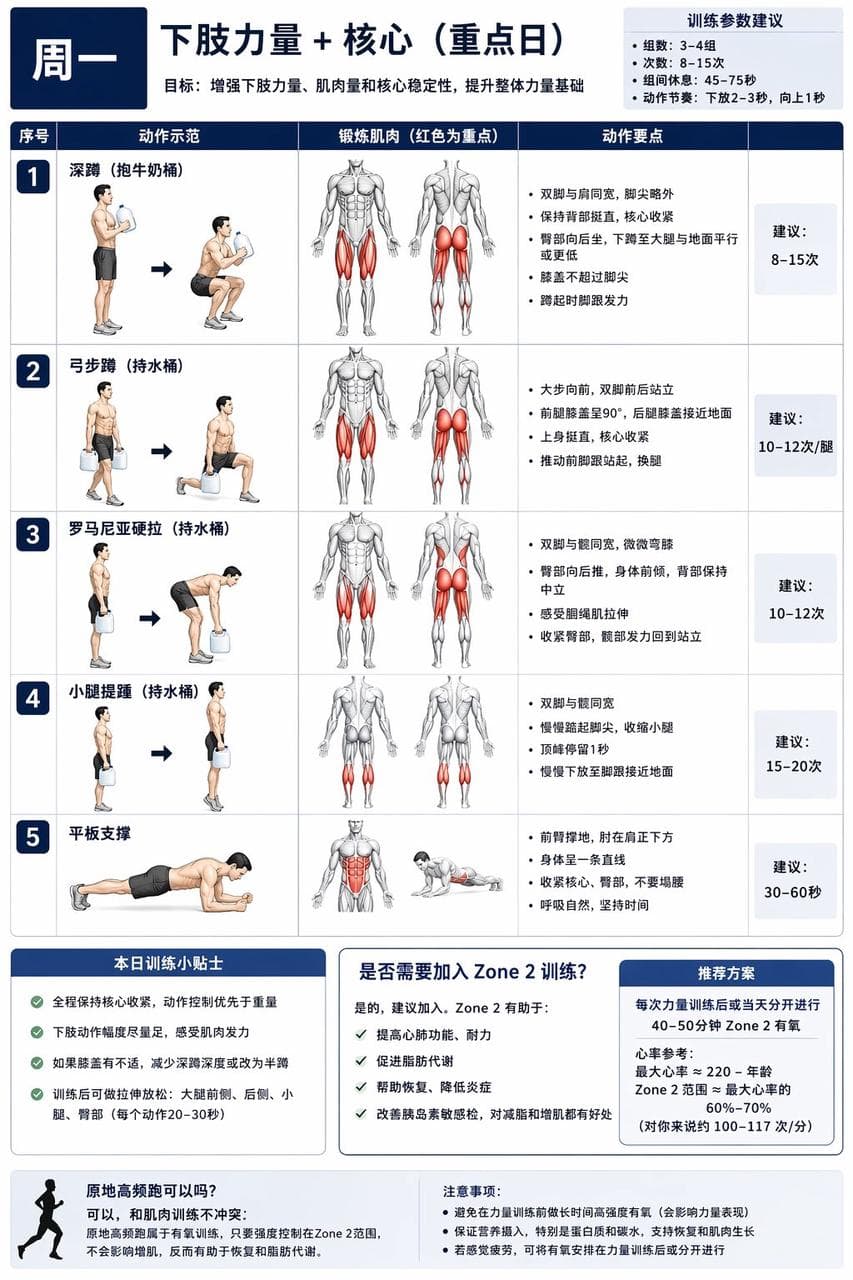
خطة تدريب لزيادة العضلات
ضع لي (وأنا في عمر XX) خطة شاملة لتدريب زيادة العضلات يمكن إكمالها في المنزل بدون أجهزة أو بكمية قليلة من الأجهزة، مع شرح ومخططات توضيحية. (المتطلبات الخاصة بي تالية. يمكنك تعديلها بنفسك): لديّ زجاجة حليب سعة 1 جالون مم…
موجه
ضع لي (وأنا في عمر XX) خطة شاملة لتدريب زيادة العضلات يمكن إكمالها في المنزل بدون أجهزة أو بكمية قليلة من الأجهزة، مع شرح ومخططات توضيحية. (المتطلبات الخاصة بي تالية. يمكنك تعديلها بنفسك): لديّ زجاجة حليب سعة 1 جالون مملوءة بالماء بدلاً من الدمبل، يمكن ملء الماء كاملاً أو جزئياً للتكيف مع المتطلبات المختلفة لحركات المبتدئين، ولديّ أيضاً مجموعة من أحزمة المقاومة. دورة التدريب أسبوع لكل دورة، يجب التدريب على أجزاء مختلفة كل يوم، مع وجود يوم راحة أو تدريب موزّع لتجنب إرهاق العضلات في منطقة معينة مما يؤثر على نتائج التدريب. مطلوب تدريب اللب والقوة السفلية، عضلات البطن، عضلات الصدر، الكتفين والذراعين العلويين بشكل أساسي. أنشئ أولاً مخططاً إجمالياً، ثم وفقاً لتعليماتي أنشئ مخططات خطط التدريب اليومية بشكل منفصل. لا تستخدم صوراً واقعية للأشخاص في الصور، استخدم رسوم توضيحية لرجل عضلات شائعة في مخططات اللياقة، وفي الرسوم التوضيحية تظهر أجزاء العضلات التي يتم تدريبها باللون الأحمر.
كيفية استخدام هذه المطالبة
اقرأ المطالبة خطة تدريب لزيادة العضلات الكاملة وحدد متطلبات الموضوع والنمط والكاميرا والإضاءة والتركيب قبل الإنشاء.
استبدل العناصر النائبة بين قوسين أو على شكل وسيطة بمتطلبات المنتج أو الشخصية أو العلامة التجارية أو المشهد أو لوحة الألوان أو نسبة العرض إلى الارتفاع.
افتح https://www.gptimagehub.com/ar/generate?promptId=cmogxshq600rrxt5gg8oilsjn، وقم بإنشاء الصورة، ثم قم بتحسين المطالبة باستخدام موضوع أو نص أو تخطيط أو قيود سلبية أكثر تحديدًا إذا لزم الأمر.
الأسئلة الشائعة السريعة
ما هو أفضل استخدام للموجه خطة تدريب لزيادة العضلات؟
يتم استخدام هذه المطالبة بشكل أفضل مع صور أخرى حيث تريد بنية قابلة لإعادة الاستخدام، واتجاه مرئي مفصل، وجودة إخراج متسقة.
هل يمكنني تعديل المطالبة قبل الإنشاء؟
نعم. يظهر نص المطالبة الكامل في هذه الصفحة حتى تتمكن من تغيير الموضوعات وأسماء المنتجات والألوان والتركيب ومصطلحات الكاميرا ونسبة العرض إلى الارتفاع وملاحظات النمط قبل الإنشاء.
ما النموذج الذي يجب أن أستخدمه مع هذه المطالبة؟
استخدم النموذج الموضح في بيانات تعريف المطالبة كنقطة بداية افتراضية. إذا كان نموذج صورة آخر يدعم نفس نسبة العرض إلى الارتفاع ونمط التعليمات، فيمكنك تعديل المطالبة ومقارنة النتائج.